christianeb30638112
Participant
February 4, 2017
Answered

margins in textfields

  • February 4, 2017
  • 5 replies
  • 7629 views

is there a possibility to reduce the margins in textfields of acrobat pro dc?

This topic has been closed for replies.
Correct answer JR Boulay

Hi.

Yes.

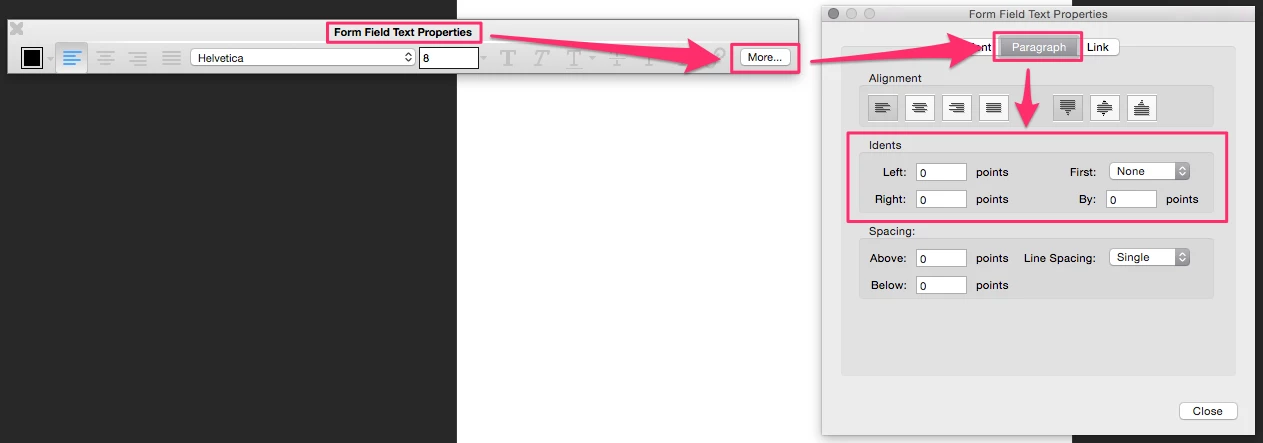
Tick on the RTF option in the field's properties.

Hit ctrl-E (cmd-E on Mac OS), then you can set the inner margins.
5 replies

Participant
December 5, 2017

This does work, but only in preview. How do you get it to stick? Also, to deal with what seems to be automatic padding, you have to set the spacing above value to a minus value - in my case, a multinline field, Arial 9, I had to set it to -4. But when I clear the field and go back into design mode, whatever I set disappears.

JR Boulay
Community Expert
Community Expert
February 5, 2017

Acrobate du PDF, InDesigner et Photoshopographe
JR Boulay
Community Expert
Community Expert
February 4, 2017

You must first get the Hand tool, clic in the text field and then clic the "More" button.

Resulting window will not be the same.

Ain't Acrobat UI nice?

Acrobate du PDF, InDesigner et Photoshopographe
christianeb30638112
Participant
February 4, 2017

I don’t see it; the hand tool is not available

Van: JR_Boulay

Verzonden: zaterdag 4 februari 2017 18:38

Aan: christiane brouckaert

Onderwerp: margins in textfields

margins in textfields

created by JR_Boulay <https://forums.adobe.com/people/JR_Boulay> in PDF Forms - View the full discussion <https://forums.adobe.com/message/9309713#9309713>

christianeb30638112
Participant
February 4, 2017

thank you but I still have a problem; when I tick on the rtf option i get indeed:

and when I click on more (meer in dutch) i get other possibilities:

there is no opportunity for paragraph and idents

JR Boulay
Community Expert
JR BoulayCommunity ExpertCorrect answer
Community Expert
February 4, 2017

Hi.

Yes.

Tick on the RTF option in the field's properties.

Hit ctrl-E (cmd-E on Mac OS), then you can set the inner margins.

Acrobate du PDF, InDesigner et Photoshopographe
christianeb30638112
Participant
February 5, 2017

Thank you for your answer but as you can see below; the handtool is not highlighted so I cannot select it:

cid:image001.png@01D27FBC.DB3CA690

Van: JR_Boulay

Verzonden: zaterdag 4 februari 2017 14:20

Aan: christiane brouckaert

Onderwerp: margins in textfields

margins in textfields

created by JR_Boulay <https://forums.adobe.com/people/JR_Boulay> in PDF Forms - View the full discussion <https://forums.adobe.com/message/9309253#9309253>

JR Boulay
Community Expert
Community Expert
February 5, 2017

First, you must close the "Prepare Form" tools panel (clic the cross), or use the Preview mode.

Acrobate du PDF, InDesigner et Photoshopographe