
Question
Mark more than 1000 elements in a PDF document as decorative using JavaScript
Hi all,
I have to mark more than 1000 elements in an PDF as decorative. I try a JavaScript printed here:
/*
 * This script iterates through all annotations in a tagged PDF document.
 * It checks whether annotations lack alternative text and marks them as decorative.
 * This script is designed to run in the Adobe Acrobat Pro debugger.
 */

// Check if the document has a tag tree
var doc = this;
if (!doc.catalog.spans) {
    console.println("This document does not have a tag tree. Please ensure the document is properly tagged before running this script.");
} else {
    // Get the total number of annotations in the document
    var numAnnotations = doc.numAnnots;
    if (numAnnotations === 0) {
        console.println("No annotations are found in this document.");
    } else {
        console.println("Processing annotations...");

        for (var i = 0; i < numAnnotations; i++) {
            // Access each annotation
            var annotation = doc.getAnnot(i);

            if (annotation !== null) {
                // Check if the annotation contains an 'Alt' key (alternative text)
                if (!annotation.alt || annotation.alt.trim() === "") {
                    // If no alternative text, mark it as decorative
                    annotation.setProps({
                        Contents: "Marking as decorative",
                        alt: "", // Ensure Alt is empty
                        flags: annotation.flags | 0x10 // Add the decorative flag (bitmask)
                    });

                    console.println("Annotation on page " + (annotation.page + 1) + " marked as decorative.");
                } else {
                    console.println("Annotation on page " + (annotation.page + 1) + " already has alternative text.");
                }
            }
        }

        console.println("Processing completed.");
    }
}
But the output is:
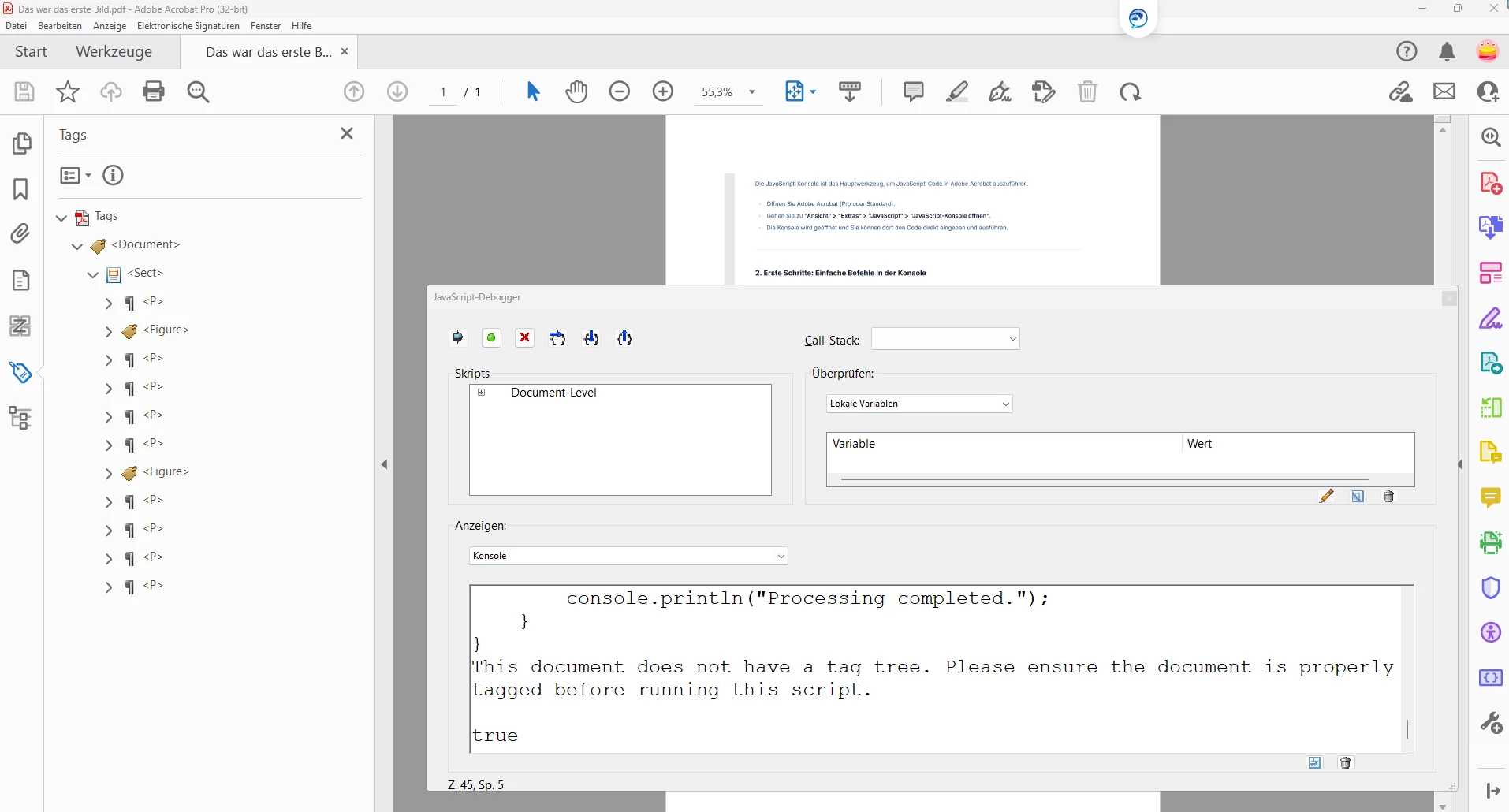
This document does not have a tag tree. Please ensure the document is properly tagged before running this script.
true
In the folowing picture you can see that I'm using Adobe Acrobat Pro and that my Document has also a Tag-Tree. Of course it is not the document with more than 1000 elements but the script should also work with this small document.
Maybe one of you could help me with my problem.
Regards Norbert


 AdChoices