Inspiring
July 26, 2021
Answered

math type parenthesis gone after converting to pdf

  • July 26, 2021
  • 3 replies
  • 5314 views

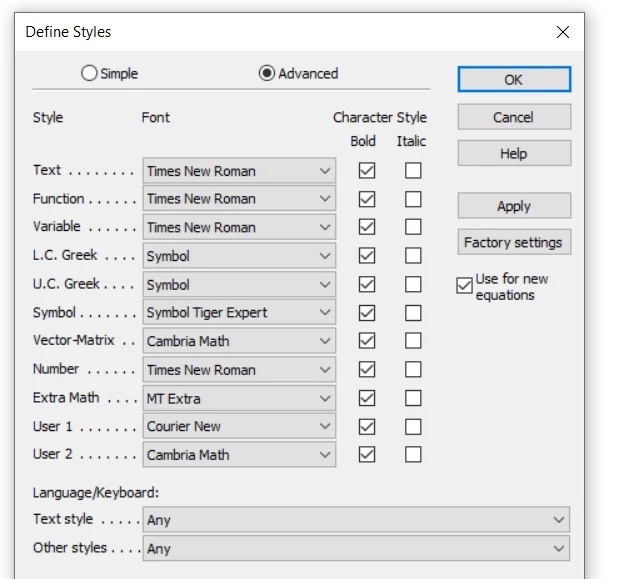
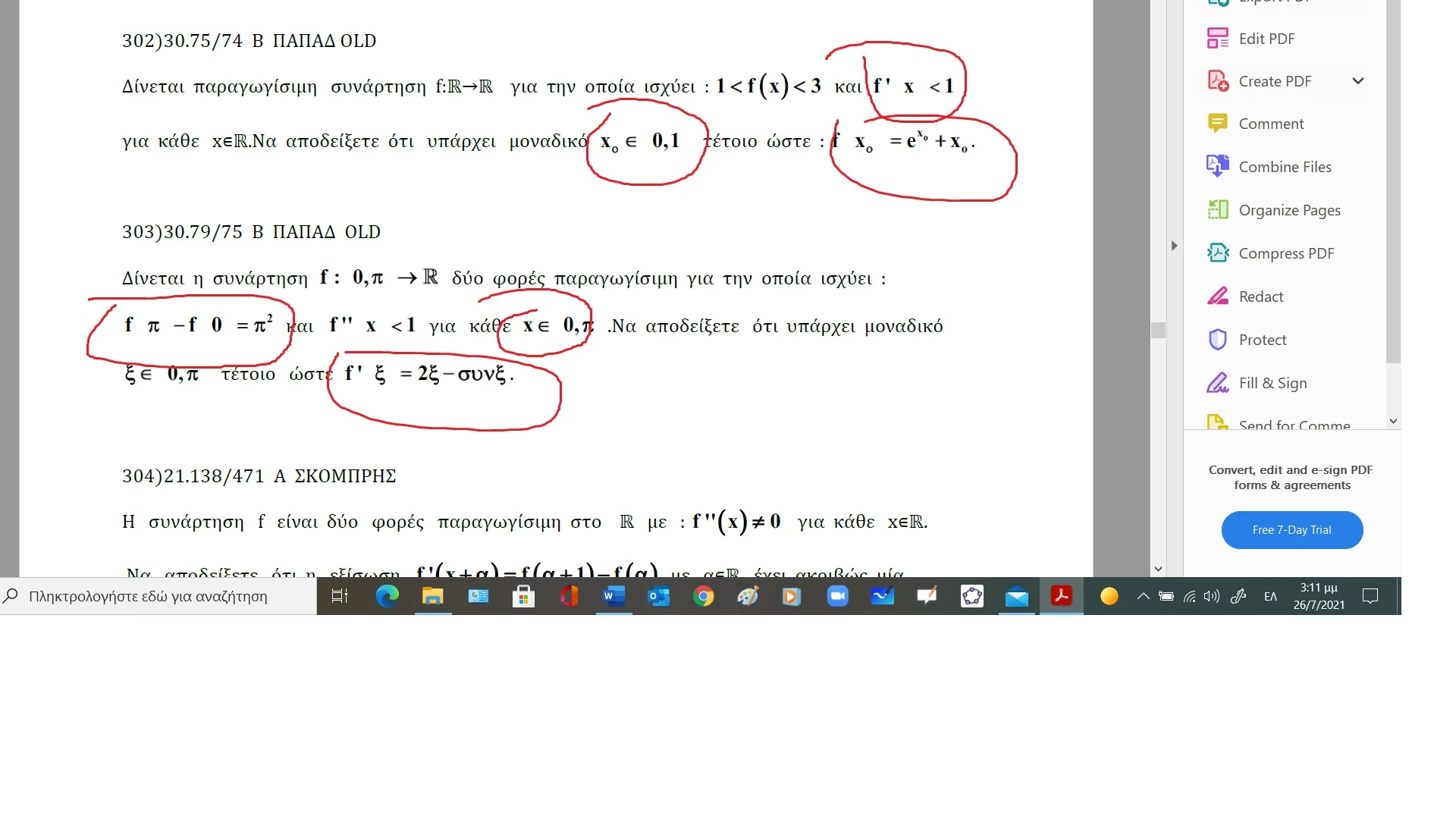
Good  afternoon.I  am   using  mathtype  for  years  and   all  the  symbols  were appearing  correctly  after  saving  doc  as  pdf.The  last days i  notice  that  allready  saved pdf  when  open them , the  symbol  of  parenthesis is  gone. Is  an  issue  of  pdf/office/mathtype?Maybe  any  update  of  one  of  these  softwares  deregulates  everything?I  try  again  one  by one  each  equation (  to  a  doc  with 91  pages)  recopy  and  paste  from  math  type  and  resave  as  pdf.This  works  but  is  very hard  to  do  it  gain and  again  for  all  documents  each  time.The  second  atatched  is  the  font  that  i  am  using  with  mathtype
This topic has been closed for replies.
Correct answer Karl Heinz Kremer

This looks like a font problem. I am not familiar with "mathtype", so I don't know if it does embed the fonts it uses (either fully, or as a subset). You can find out if a font is embedded by bringing up the document properties (Ctrl-D or Cmd-D on a Mac), then go to the Fonts tab. Here all the fonts that are used in the document are listed, and also if they are embedded or not. You may want to talk to the makers of mathtype about what they are doing and if there is anything you can do in the application to fix this problem. 

3 replies

Participant
July 4, 2023

You can make pdf in two ways: Exporting and Printing.

I think the problem is with the "Exporting to PDF/XPS" instead of printing to pdf.

Try printing and using "Adobe PDF" or "Microsoft Print to PDF". Voilà!

Inspiring
July 17, 2023

Thank you

Participant
November 27, 2021

I had the same problem and could solve it:

not working


working


Inspiring
December 23, 2021

thank you

Karl Heinz  Kremer
Community Expert
Karl Heinz KremerCommunity ExpertCorrect answer
Community Expert
July 27, 2021

This looks like a font problem. I am not familiar with "mathtype", so I don't know if it does embed the fonts it uses (either fully, or as a subset). You can find out if a font is embedded by bringing up the document properties (Ctrl-D or Cmd-D on a Mac), then go to the Fonts tab. Here all the fonts that are used in the document are listed, and also if they are embedded or not. You may want to talk to the makers of mathtype about what they are doing and if there is anything you can do in the application to fix this problem. 

Inspiring
October 7, 2024

I do not understand what  do you mean  with embedd or  non embedd fonts