Known Participant
November 26, 2024
Answered

MAXIMISED WINDOW

  • November 26, 2024
  • 2 replies
  • 805 views

How do I get Acrobat to run in maximised window?

I am sick of constantly having to maximise EVERY SINGLE WINDOW when I open Acrobat.

There used to be a way of finding the .exe file, and then right click and select a "run maximised" option.  Can't find that.

PS  I'm running Acrobat in the "old mode" as the newest version of Acrobat is awful.

Thanks all.       
This topic has been closed for replies.
Correct answer try67

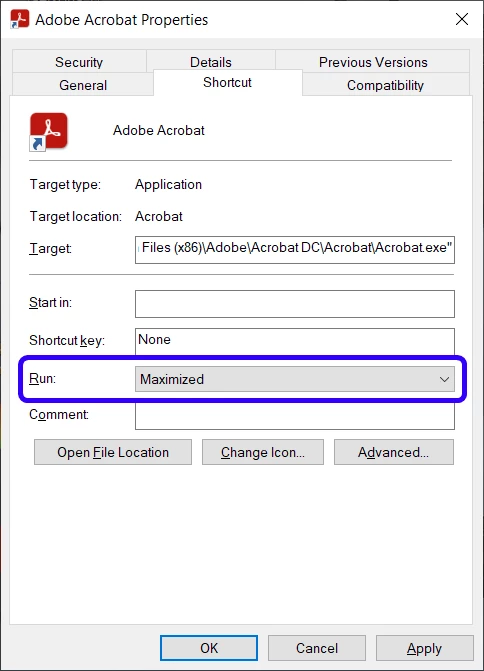
It's not a setting of the EXE file itself, but it is of a shortcut to it. Create a shortcut for acrobat.exe, go to its Properties, and under the Shortcut tab change the "Run" drop-down to "Maximized":


2 replies

JR Boulay
Community Expert
Community Expert
November 26, 2024

I have the same issue with Acrobat, Photoshop, InDesign and Illustrator since the last update!

Acrobate du PDF, InDesigner et Photoshopographe
try67
Community Expert
try67Community ExpertCorrect answer
Community Expert
November 26, 2024

It's not a setting of the EXE file itself, but it is of a shortcut to it. Create a shortcut for acrobat.exe, go to its Properties, and under the Shortcut tab change the "Run" drop-down to "Maximized":


Known Participant
November 26, 2024

Thanks.  I set up the shortcut , set Run Maximised.  Then when I opened a pdf by double clicking on it in Explorer, it did NOT open maximised.  

I had to Restart my computer.  Then it worked.