
Measurement tool text only showing as comment
I had used acrobat before and did not have this kind of trouble with adding measurement dimensions to a file to refer to later.
When I have corrected the documents scale and precision, I was able to use the measuring tool similar to a CAD program,
however, now it appears the only options are to have it embed as markup comments or not at all.
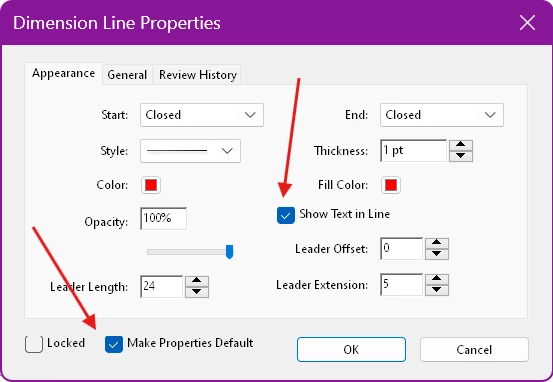
Is there not a way to have the text shown at all times for the dimension drawn after completing the tool? (as it appears WHILE you are drawing the measurement...)
Has this moved elsewhere in the app/preference?
Having it as a comment may work for online/looking at a screen, but after printing it doesn't help anyone. It just shows as lines and arrows....
I never had to manually place text for the measurement as a seperate text box/object that I can recall.
Just wanting to make sure I'm not going crazy...;)


 AdChoices