
Menu text size suddenly larger than every other application
Is this yet another annoying new "feature" of the recent Acrobat update?
These two screenshots are the same scale.
This is what the text size should look like:
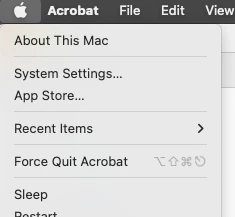
But all Acrobat menus are now a couple points larger than they should be
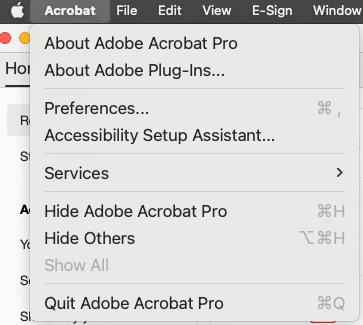
Any way to disable this? Or am I stuck with it? No, I do not plan to ever use "New Acrobat", but I checked that version and the menu text size is screwed up in New Acrobat, too.
Thanks for any help.
EDIT: Oddly, today it's smaller, but still not correct. I didn't even know apps could control the UI like this. The default Mac menu font is Lucida Grande 12pt. Yesterday, Acrobat menus were showing as Lucida Grande 16pt. Today, the Acrobat menus are showing as Lucida Grade 13pt. Honestly, I probably wouldn't even notice if I wasn't looking for it, but still seems like something that should definitely not be happening, let alone possible.
Here's a side-by-side comparison
Yesterday:

Today

 AdChoices