Participant
December 9, 2024
Answered

Microsoft Information Protection (MIP) does not work after 24.004.202xx planned update

  • December 9, 2024
  • 5 replies
  • 8696 views

Microsoft Purview Information Protection support in Acrobat


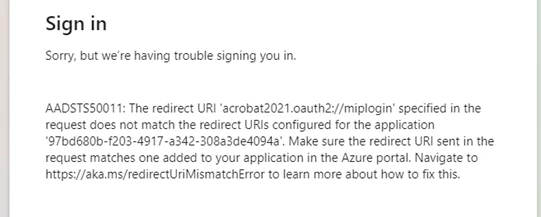
The feature works perfectly in version 24.003.20180, but updating Acrobat past that version we are getting an error:

AADSTS50011: The redirect URI 'acrobat2021.oauth2://miplogin' specified in the request does not match the redirect URIs configured in the application 97bd680b-f203-4917-a342-308a3de4094a     
 

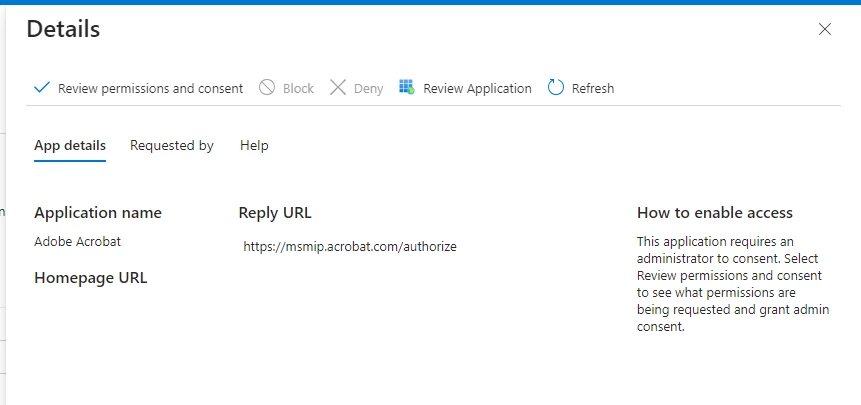
checking Azure > Enterprise Applications, Adobe  Acrobat (application ID 97bd680b-f203-4917-a342-308a3de4094a) is configured with reply URL 'https://msmip.acrobat.com/authorize

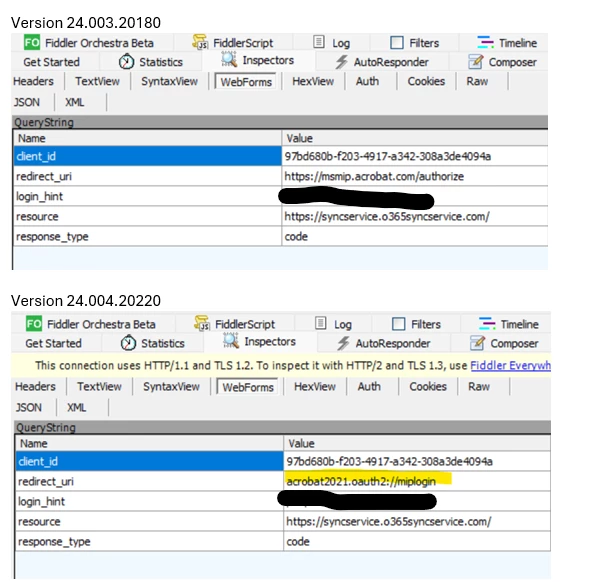
We did a Fiddler trace with version 24.003.20180 and 24.004.20220.  The trace shows the redirect_uri in those versions are different.
 

Microsoft was originally contacted regarding this issue.  However, they were unable to assist as this application is owned by Adobe - The application owner would have to update the application redirect_url


 Has anyone else using this feature experienced this?


Correct answer Pawan27574148e8ve

Hello,

This seems related to browser authentication, which was turned on for some users recently.

Please try the following steps:

1.  In Acrobat or Reader,  clear the saved account credentials and Exit Acrobat/Reader 

Preferences-->Security-->Microsoft Purview Information Protection-->Clear remembered account information

2.  Turn off browser authentication by instructions at link: https://helpx.adobe.com/in/enterprise/kb/mpip-support-acrobat.html#setup-requirements-browser-auth .   

3. For Reader we can use 

  • Computer\HKEY_LOCAL_MACHINE\SOFTWARE\Policies\Adobe\Adobe Reader\Trunk\FeatureLockDown
  • Name: bMIPExternalAuthAdmin   Value: 0

3.  As we would soon make Browser Authentication default, please share fiddler logs to investigate this further .   Refer “how to download Fiddler logs” on link.

5 replies

Participant
August 7, 2025

Microsoft Information Protection (MIP) failing after the 24.004.202xx update is a known issue in Acrobat. The fix: clear saved account credentials in Acrobat or Reader (via Preferences → Security), then completely exit and restart the app. This often restores proper MIP functionality.

Participant
September 5, 2025

Do you have any other thoughts or solutions? That method didn't work for us. I have 4 users who had tried opening up a document with the sensitivity label, and two of us can access no problem, however the other two users get the redirect error message. We are in the Microsoft GCC High tenant. We tried deleting the app in Entra as well, and I was able to do the admin consent with no issues, but it doesn't work for the other users.

Participant
January 30, 2025

I tried changing the setting as you described and this did not change the symptoms.

This issue has to do with O365 user logging into the "Adobe Acrobat" Enterprise Application in Azure - specifically application ID "97bd680b-f203-4917-a342-308a3de4094a"


from the above, we can see the reredirect URI in the request from the application (Adobe Desktop App) is acrobat2021.ouauth2://miplogin


and we can see from the below, the reply URL configured in the  Enterprise Application (Azure) is "https://msmip.acrobat.com/authorize"


If you follow the link provided in the error, it sends you to a Microsoft document that explains how to resolve this issue - basically, by updating the enterprise application reply URL


Error AADSTS50011 the redirect URI does not match the redirect URIs configured for the application | Microsoft Learn


Unfortunately, the application cannot be updated by anyone but the owner, in this case Adobe.


We opened a case with Microsoft that confirmed there is nothing they can do and the issue must be resolved by Adobe.


We have had a case opened with Adobe since before Christmas and the issue hasnt been resolved.


This worked fine in version 24.003.20180.  And if I roll back our Adobe version to this version, it will work again.

This feature does not work in version 24.004.20220 and above, to include the newest release 24.005.20390


Adobe Employee
February 3, 2025

Hello,

We have registered both redirect-uris with Acrobat app ( "https://msmip.acrobat.com/authorize" and acrobat2021.oauth2://miplogin). 


Please share fiddler log for your issue ( Refer “how to download Fiddler logs” on link)


Also the registry for Acrobat would be slightly different:

  • Computer\HKEY_LOCAL_MACHINE\SOFTWARE\Policies\Adobe\Adobe Acrobat\DC\FeatureLockDown
  • Name: bMIPExternalAuthAdmin   Value: 0
  •  


Participant
February 3, 2025

I attempted again, but it did not work.  We are in the GCC-H (government community cloud - high) environment within Office365/Azure.


Unfortunately, I cannot share the fiddler trace here in this forum, can you access the case?  

Case number is ADB-37562466-V7P0

The fiddler trace in the case is somewhat old, perhaps 2 weeks or so.  I will prepare another if this is an option.  


alternatively, I can share individual screen shots like the original ones posted - redacted of course.


I was able to look at the application in Azure commercial, and it seems like the url is the new one

however, the one from GCC-H is still the old one.


Participant
January 27, 2025

I just noticed I am having the same issue today.

Adobe Employee
January 28, 2025

Hi @defaultdf1pf37yavbh , @defaultrsshphvq4oc6 , @philj25466186 

Sorry for the inconvenience caused to you. We'll further investigate the issue at our end and update you at the earliest. Please upload diagnostic logs for the issue. Diagnostic logs can be taken as per https://helpx.adobe.com/in/acrobat/kb/acrobat-diagnostics.html 

You can share the log ID with us here. 


Thanks,

Shakti K 

Participant
January 7, 2025

I am having the same exact problem:


In fact, I am also seeing that when I try to consent the Adobe Reader Enterprise App in Entra ID, I get redirected to msmip.reader.com, and as far as I can tell (though, I was surprised to find out) reader.com doesn't appear to be owned by Adobe:

Also notice that NSLOOKUP resolves for the Acrobat URL that you get redirected to when doing the same for the Adobe Acrobat (not Reader) Enterprise App consent process.


This is what reader.com resolves too:

And.. Entra ID logs effectively say the same thing that original poster called out in their Fiddler trace.. which is that the installed app is presenting the incorrect information to the Enteprirse App, and that this is a developer issue:


Please help!

Participant
January 13, 2025

Hello - any update on this?

S_S
Community Manager
Community Manager
December 16, 2024

Hi @defaultdf1pf37yavbh,


Hope you are doing well. Sorry for the trouble.


It looks like the browser authentication is not set up for the workflow to follow through.


Would you mind trying the same and letting us know if it works?

Please refer to the Setup requirements for browser authentication in the MIP Workflow here: Microsoft Purview Information Protection support in Acrobat


Look forward to hearing from you.


-Souvik

Participant
December 20, 2024

The system has been configured in accordance with the document provided.


Further internal testing revealed the feature works in Acrobat version 24.003.20180, but was broken in all version after.