
Participant
November 21, 2023
Question

MIP Plug-in issue

  • November 21, 2023
  • 1 reply
  • 1134 views

Hi all


I'm trying to enable MIP plugin for adobe. As per my understanding, the plugin is bundled with the installer for latest vereions. Even though that I have the plug in installed, it is not activatived as you can see below. 
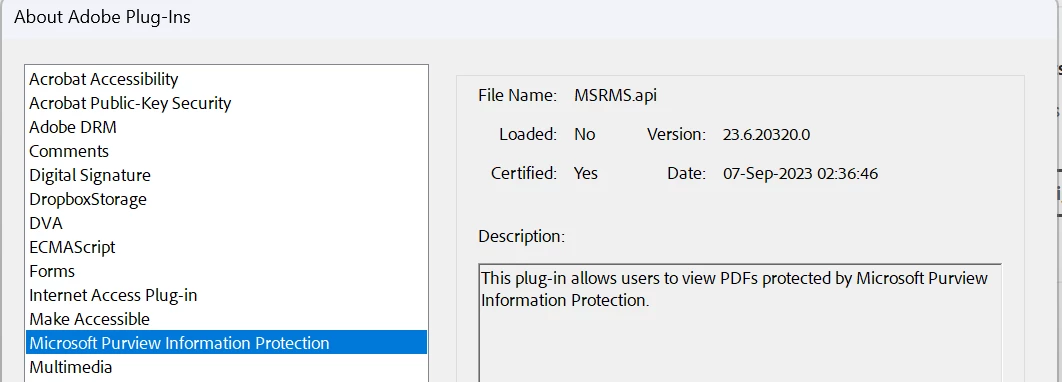
My question is how we can activate the MIP plug in, is this related to computer registery keys? 

This topic has been closed for replies.

1 reply

Amal.
Legend
November 21, 2023

Hi there


Hope you are doing well and thanks for reaching out.


Please go through the help pages listed below and see if that works:

https://helpx.adobe.com/acrobat/kb/mip-plugin-download.html

https://helpx.adobe.com/acrobat/kb/troubleshoot-issues-with-mip-files.html


If it still doesn't work, please remove the application using the Acrobat cleaner tool https://www.adobe.com/devnet-docs/acrobatetk/tools/Labs/cleaner.html  , reboot the computer once and reinstall the application using the direct link
https://helpx.adobe.com/acrobat/kb/acrobat-dc-downloads.html


Let us know how it goes.


Regards
Amal

Participant
November 23, 2023

Hello, I already done all the steps mentioned in the docunmentation including installing the plug-in and edited the regitry keys. However, nothing is changed and sensitivity labels are not showing in Adobe. 

Amal.
Legend
November 23, 2023

Hi there,


Please try to disable the protected mode for testing. Go to Preferences (Cmd, Ctrl + K) > Enhanced security > Uncheck 'Enable Protected mode at startup' > Click OK and reboot the computer once.

Note: Please turn on the security after testing to avoid any security risks


If its a work machine, please try to reach out to the IT Admin at your end and see if that helps.


~Amal