Inspiring
November 6, 2024
Question

Missing page elements when printing PDF to greyscale.

  • November 6, 2024
  • 1 reply
  • 2123 views

I created an InDesign file with RGB color transparency blend space. I exported it to an interactive PDF. The issue I have is, when the PDF is printed on three different printers, there are elements in the PDF that don't show up if it's printed to greyscale. When printed in color, the elements are there.


For example, I have a large text box with a dark blue background gradient and bold white type. It prints fine directly from InDesign to the printer, and looks correct once I export it to a PDF. When the PDF is sent to the printer, the dark blue box prints OK when printing in color, but when it's printed to greyscale, the dark blue box and type are missing even though all the other page elements are there.


I've attached a photo for explanation. I'm on an iMac, OS is Sonoma 14.6.1, Indesign is 20.0 and Acrobat Pro is version 2024.
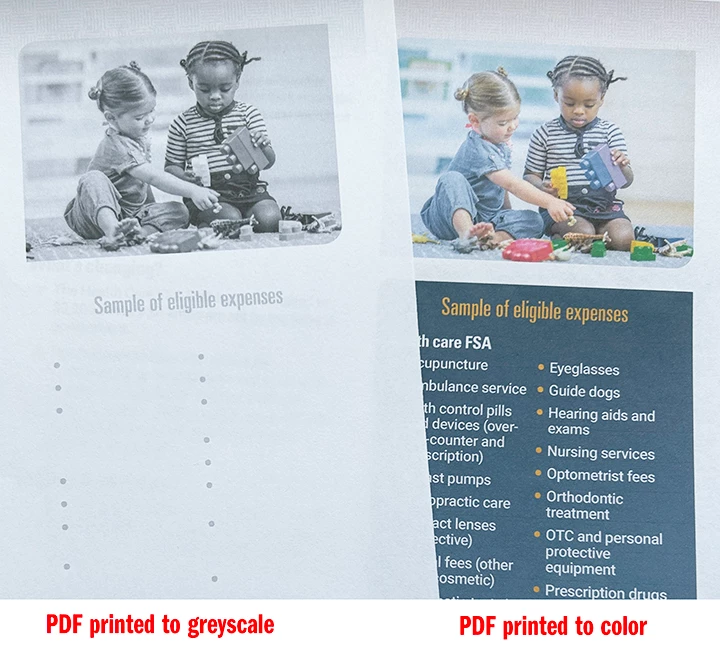
I am totally stumped. Any suggesions or guidance is very much appreciated.


EDIT TO CLARIFY: the blue box is actually a gradient of dark blue to a slightly lighter blue at the bottom. I tried changing the box to solid, and it prints correctly in both color and greyscale. So, it has something to do with the fact that it's a gradient.


~bexterinni

This topic has been closed for replies.

1 reply

Luke Jennings3
Community Expert
Community Expert
November 7, 2024

Do you need to export to an interactive pdf? I believe this will flatten any effects which could be the problem. Is the blue gradient a spot color? Does the gradient appear in print when the pdf/X-4 InDesign export setting is used? As a work-around, you could make a copy of the pdf and apply a preflight fixup to convert it to grayscale. Or you could replace the gradient effect with an image (create the effect in InDesign, then export it as an image and place it into InDesign). Can you upload a sample page of the pdf so we can have a look?

Inspiring
November 7, 2024

Hi Luke – yes, this needs to be interactive due to hyperlinks and internal page navigation. All of the colors in the palette are RBG process builds. The gradient is dark blue RGB process build to a lighter blue RGB process build. When I tried exporting to PDF/X-4 and printed it, I got the same results: it prints in color, it does not print in greyscale. Unfortunately I'm unable to upload a PDF because the information is proprietary.


This document will live online on a client's intranet, so the hope is that most users will access and view online/digitally anyway without printing, which is why a B&W version of the PDF isn't really required. TBH, I'm not sure why someone even tested printing it in B&W to begin with, but since they did, it's now my issue to try to solve.


Thank you for your response!

Luke Jennings3
Community Expert
Community Expert
November 7, 2024

It's hard to pinpoint the cause without a sample pdf. Do you have a print setting "Simulate overprinting" (under Advanced settings) does that help? Is the gradient grouped with other objects? What swatch color is used for the white type? Are there any effects applied to the white type? As a test, try changing the white type to another color, like black.

What happens when you replace the gradient with an image of the gradient?