sabine1105
Participant
September 17, 2018
Answered

Missing pdf maker files Acrobat 2015

  • September 17, 2018
  • 1 reply
  • 1922 views

Files in Acrobat to merge Acrobat works by 2015

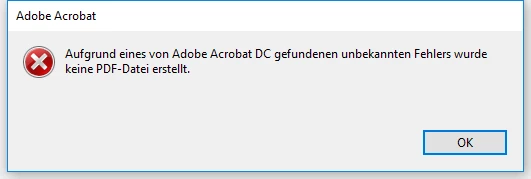
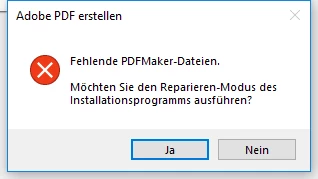
ich erhalte immer die folgende Fehlermeldung:

fehlende pdfmaker dateien office 2016 möchten Sie den Reparaturmodus des Installationsprogramms ausführen

Das Programm versucht, etwas zu installieren, bricht aber dann ab (ca 12x versucht)

manchmal auch:

Aufgrund von adobe acrobat dc gefundenen fehlers wurde keine pdf-datei erstellt

​Neuinstallation ohne Erfolg, trotz dass Update installiert wurde

This topic has been closed for replies.
Correct answer Adorobat

Hi Shivam,

I installed file as you told me, but no result, unfortunately. With pdf only it works, but not with other files

Sabine

Von: Adorobat <forums_noreply@adobe.com>

Gesendet: Dienstag, 18. September 2018 13:35

An: [email address removed by moderator

Betreff:  Missing pdf maker files Acrobat 2015

Missing pdf maker files Acrobat 2015

created by Adorobat <https://forums.adobe.com/people/Adorobat>  in Acrobat General Troubleshooting - View the full discussion <https://forums.adobe.com/message/10626560#10626560>


Hi sabine,

Could you try rebooting the machine once if you haven't already and check. If that doesn't work, set Acrobat to run as administrator using the steps given in the following link: Run an Adobe program as administrator | Windows 7, Vista and try combining files again.

If that doesn't work, try replicating the issue in a new user account by clicking on the Start button then select Settings  > Accounts  > Family & other people > Add someone else to this PC.   Login into that account, launch Acrobat from there and check.

If issue still persists, remove Acrobat DC using cleaner tool found here: Download Adobe Reader and Acrobat Cleaner Tool - Adobe Labs , restart the computer and then reinstall Acrobat DC from here -Download Pro or Standard versions of Acrobat DC | Non-subscription You need your Acrobat DC serial number to complete the installation.

Let us know if you need any help.

Shivam

1 reply

Adorobat
Community Manager
Community Manager
September 17, 2018

Hi sabine1105,

As the issue description above, you are facing issue when trying to combine files in Acrobat, is that correct?

Please try the troubleshooting steps given in the following help document:

Fix PDFMaker unavailability in MS Office

Also, try the troubleshooting steps given in the following forum thread discussing similar issue:

Missing PDFMaker files

Also, let us know the version of Acrobat and the operating system installed on the machine? You may refer to the steps given in this link on how to check the version in Acrobat: Identify the product and its version for Acrobat and Reader DC

Let us know if you need any help.

Shivam

sabine1105
Participant
September 17, 2018

Hi Shivam,

The advices in the document below ( <https://helpx.adobe.com/in/acrobat/kb/pdfmaker-unavailable-office-2007-office.html> Fix PDFMaker unavailability in MS Office)I had found already somewhere in the net and I did all steps, but  unfortunately without success.

To your questions:

As you see in the screenshot, version number is 2015.006.30280

I’m using Windows 10

The program was running perfectly for 16 month.

I don’t know exactly, when this feature did not run anymore, because I don’t need it so often and the rest of the program is ok. Making pdf of one file also is possible.

I remember that I used this feature (combine files in Acrobat) a few months ago, when I combined several jpg’s to one pdf without problems.

If I try to combine files, I get this answer:

fehlende pdfmaker dateien möchten Sie den Reparaturmodus des Installationsprogramms ausführen

After that the program tries to do this, but stops after 2 minutes. Sometimes I then get another answer:

fehlende pdfmaker dateien office 2016 möchten Sie den Reparatur-modus des Installationsprogramms ausführen

something also is curious:

In word, powerpoint and outlook I have ADOBE PDF in the menu line, but not in excel.

Adobe isn’t able to combine any files to one pdf, but pdf itself is possible

Meanwhile I didn’t have any problems and no remarkable changes in my system. This is the reason, why I’m wondering.

I hope, my English is not too bad and that you have an other idea.

Thanks for answering so quick

Sabine

Von: Adorobat <forums_noreply@adobe.com>

Gesendet: Montag, 17. September 2018 14:54

An: [personal info. removed by moderator]

Betreff:  Dateien in Acrobat zusammenführen funktioniert nicht      Acrobat 2015

Dateien in Acrobat zusammenführen funktioniert nicht      Acrobat 2015

created by Adorobat <https://forums.adobe.com/people/Adorobat>  in Acrobat General Troubleshooting - View the full discussion <https://forums.adobe.com/message/10624301#10624301>

Adorobat
Community Manager
Community Manager
September 18, 2018

HI Sabine,

Could you try updating Acrobat to the latest patch 2015.006. 30448 and check if that resolves the issue?  You may also download updates from here: 15.006.30448 Planned update, August 14, 2018 — Release Notes for Acrobat DC Products.   Reboot the machine after installing update and check.

-Shivam