February 28, 2017
Question

Missing Popupmenues after some editing actions!

  • February 28, 2017
  • 7 replies
  • 2562 views

I hope this is the right place to get support?

Software:

  • Adobe Acrobat Reader DC, Version: 2015.023.20070
  • Adobe Acrobat X, Version: 10.1.16

Operating System: Windows 7 Enterprise 64Bit-DE.Hardware:

  • Intel(R) Xeon(R) CPU E5-1630 v3 @ 3.70GHz
  • 16-GB Ram

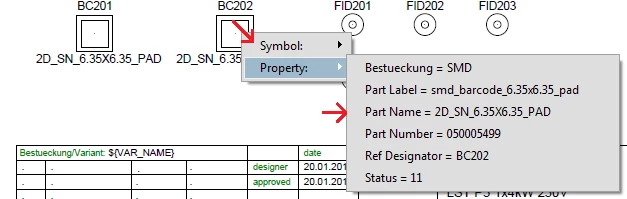
We use Acrobat in our Company on some Computers. For Instance since one of the last, from Adobe automatically installed Updates (unknown), we have Problems with the right-mouse-button Property-menue (or direct click on object->popup-menues / see picture). they dissappears after some actions.

Problem: The Popup-Menues are lost or exists no longer (missing)! After...

  • we combine Pdf documents (merge) -> all popmenues are lost, or
  • we use Insert another Pdf from file, the Popmenues from the inserted file -> lost, or
  • we edit for example, the documents -open Properties, like the "Layout and Macnification" -> ok -> save -> reopen -> also lost!

In this screenshot-area you can see a created popup-menue from which I talk:

(normaly it pops up when you click at the object in the PDF or rmb-click) - this popups disappears as above described...
This topic has been closed for replies.

7 replies

Legend
April 16, 2018

Look in the JavaScript console. Are there any messages when you re-open the merged file and try to use popups?

ulrikeh97284970
Participant
April 16, 2018

Hello,

I have almost the same problem, when merging PDF files with pop-ups created from Mentor Graphics. You can see an example via the following link:

Dateien freigegeben - Acrobat.com

Merging is Ok, that means the pop-ups remain, when the file Test_V22.pdf is the first document in the merging process. When the file Test_VX11.pdf is the first document, then the pop-ups get lost during merging.

Can anybody explain that?

try67
Community Expert
Community Expert
April 16, 2018

The reason this is happening is that the links in VX11 have the full code used for displaying the pop-ups embedded in them directly, so they are not damaged when you merge the file with another file, while the links in VX22 rely on a doc-level script (which can't be viewed directly in Acrobat because it was added without a title) to display. This doc-level script gets removed when the file is merged into another file, but not when another file gets merged into this file. Hence the results you're seeing.

Legend
March 2, 2017

So, to take a step back, what happens when two PDF files containing form fields are combined? Certainly some things may be lost according to how you merge. For example inserting and replacing pages will do different things. You presented this as being about the menus, but have you checked form fields in general? And document level scripts? Are document level scripts used?

Legend
March 2, 2017

Thanks, these methods seem little used so I was not familiar with what their results looked like. Maybe more standard than I thought. But we still need a file.

March 2, 2017

okay, before I proceed here, I contact the Support from the other Software.

First I thought it can only be an Acrobat patch, because of when I merge the error occurs, else not!. But who knows.

Bernd Alheit
Community Expert
Community Expert
March 2, 2017

jürgenh20574902  wrote

okay, before I proceed here, I contact the Support from the other Software.

First I thought it can only be an Acrobat patch, because of when I merge the error occurs, else not!. But who knows.

The last update of Acrobat X was in the year 2015.

Legend
March 2, 2017

It would be pointless to contact support as you do not have anything that is supported.


Reader is free - no support.

Acrobat X is End-of-life - no support.

Perhaps we could help you if you could manage to upload a file. These menus do not look like any standard or usual thing, so we need to know how they are made.

try67
Community Expert
Community Expert
March 2, 2017

It looks like the result of a call to the JS methods popUpMenu or popUpMenuEx...

Karl Heinz  Kremer
Community Expert
Community Expert
February 28, 2017

Here are some instructions about how to share a link using Adobe's Document Cloud: Share Documents via Adobe's Document Cloud - KHKonsulting LLC

Legend
February 28, 2017

You might also use ZIP instead, more people can read it easily...

Karl Heinz  Kremer
Community Expert
Community Expert
February 28, 2017

How are the menus implemented? Would you be able to share some files that show this behavior? We would need the original files and instructions about how to recreate the problem.

February 28, 2017

Hallo,

our Software creates automatically this popups. This is: Mentor Graphics, the Schematic Tool called "DxDesigner", Version VX2.1.

I created a Zipfile file for you (7z) and it contains 2 sample pdf-files. In "DemoSchemTest.pdf" are the popups.

But how to upload here a file? I just find "Bild einfügen" (insert Picture).

Bernd Alheit
Community Expert
Community Expert
February 28, 2017

You can upload the file to cloud.acrobat.com and share the link.