January 6, 2026
Question

Modifying Preset Adobe PDF Settings - dialog box not showing fully

  • January 6, 2026
  • 1 reply
  • 243 views

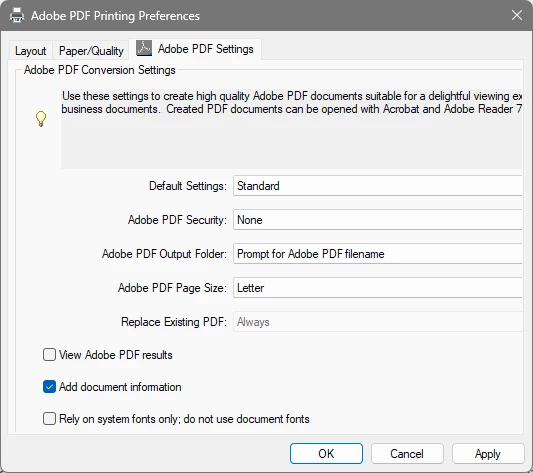
Running Acrobat Pro on Windows 11.  I am trying to modify the Adobe PDF Conversion Settings in the Adobe PDF Printing Preferences dialog box.  The selection boxes to the right of the four options for Default Settings, Adobe PDF Security, Adobe PDF Output Folder, and Adobe PDF Page Size all are missing on the right side of the box.  See below screnshots for what i would expect to see and then what I am seeing.
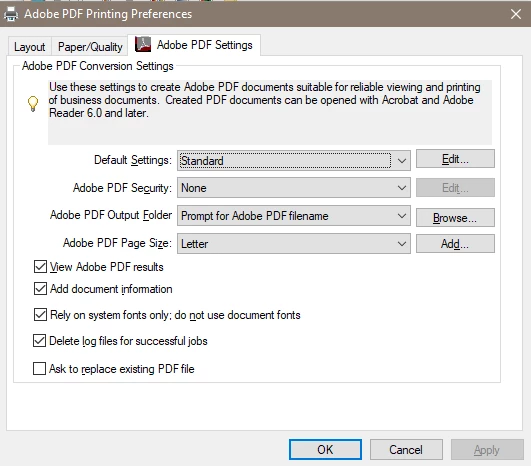
 

Screenshot 2026-01-06 021907.pngScreenshot 2026-01-06 012441.png

1 reply

Legend
January 6, 2026

Hi @46538432, 


Thanks for reaching out and sharing your findings and feedback. 
Could you let us know what version of Acrobat is installed? To check Acrobat version installed:  https://adobe.ly/3PQQ7nE


Additionally, if you have a multi-monitor setup, could you please disconnect the secondary monitor and try again? Let us know how it works.


Please ensure your copy of Acrobat is updated. To check for any pending updates, launch Acrobat, then select Help > Check For Updates.

Information on latest update available can be found here: https://adobe.ly/3YmWW4K

Best regards,
Tariq | Adobe Community Team

January 6, 2026

I am running Adobe Acrobat verson 25.001.20997.  It is fully updated.  I am not running a multi monitor setup.

Legend
January 7, 2026

Thank you for the quick response. 
Is it possible you could share a short video of the issue, while I discuss this internally with the product team. 


Best regards,
Tariq | Adobe Community Team