Participant
Oct 29, 2026 1:37 PM UTC
Answered

Most obnoxious thing in Acrobat, almost a deal breaker

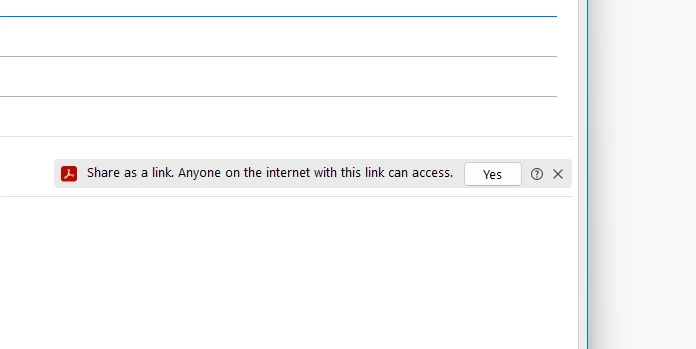
Here is the most obnoxious thing in Adobe Acrobat, and how it attaches this to Outlook emails automatically.  There is no possible way to remove it.  Not through Registry commands, not by removing permissions in Outlook . . . there is simply no way to remove it.  Adobe has made sure it cannot be removed.  No matter what you do, it comes back immediately, and not only when Adobe Acrobat updates.  It comes back within a few open and close cycles.  It has been mentioned in posts to the community for years, and no response.  I can only assume that Adobe has no intention of “fixing” this, because they want users to be forced to use this obnoxious “feature”

FAIL!

Okay, end rant . . .


    Anand Sri Bhattacharya
    Community Manager
    Oct 29, 2026 3:03 PM UTC

    Hello @Chris22519707b4xg,


    I hope you are doing well, and thank you for reaching out. Sorry for the trouble you had with the app, especially since you’ve already tried disabling the integration and it returns within a few Outlook restarts.


    The banner in your screenshot is Acrobat’s “Share as a link” prompt. Adobe documents its attachment-prompt controls under Acrobat > Settings in a new Outlook message window: Acrobat plug-in settings. This is separate from Outlook’s add-in permissions.

    If Acrobat > Settings is not available, please let us know whether you use classic Outlook or new Outlook, along with the Outlook and Acrobat version/build. Also check with your Microsoft 365 administrator whether Adobe Acrobat for Microsoft Outlook is centrally deployed, particularly if it returns after you remove it.


    You can also collect the logs from the affected machine and share the log ID with us, which will help us in the investigation. To collect the logs, please refer to this article: https://adobe.ly/3UjAQ4M


    I hope this helps, and please reach out if you need any assistance.

    Regards,

    Anand Sri


    3 replies

    Anand Sri Bhattacharya
    Community Manager
    Community Manager
    Oct 29, 2026 3:03 PM UTC

    Hello @Chris22519707b4xg,


    I hope you are doing well, and thank you for reaching out. Sorry for the trouble you had with the app, especially since you’ve already tried disabling the integration and it returns within a few Outlook restarts.


    The banner in your screenshot is Acrobat’s “Share as a link” prompt. Adobe documents its attachment-prompt controls under Acrobat > Settings in a new Outlook message window: Acrobat plug-in settings. This is separate from Outlook’s add-in permissions.

    If Acrobat > Settings is not available, please let us know whether you use classic Outlook or new Outlook, along with the Outlook and Acrobat version/build. Also check with your Microsoft 365 administrator whether Adobe Acrobat for Microsoft Outlook is centrally deployed, particularly if it returns after you remove it.


    You can also collect the logs from the affected machine and share the log ID with us, which will help us in the investigation. To collect the logs, please refer to this article: https://adobe.ly/3UjAQ4M


    I hope this helps, and please reach out if you need any assistance.

    Regards,

    Anand Sri


    Translate
    Participant
    Oct 29, 2026 4:49 PM UTC

    Wow, that did fix the problem.  Opening the settings in a new email was something I hadn’t tried.  Great advice!

    Translate
    Anand Sri Bhattacharya
    Community Manager
    Community Manager
    Oct 29, 2026 5:01 PM UTC

    ​@Chris22519707b4xg I am glad that the advice worked. Please feel free to reach out if you need any assistance.


    Regards,

    Anand Sri.

    Translate