
Known Participant
April 11, 2017
Answered

Mouse Enter does not work

  • April 11, 2017
  • 1 reply
  • 1469 views

On the Actions tab, I select Mouse Enter as my trigger.  Then I add a script for it.

app.alert(event.target.value)

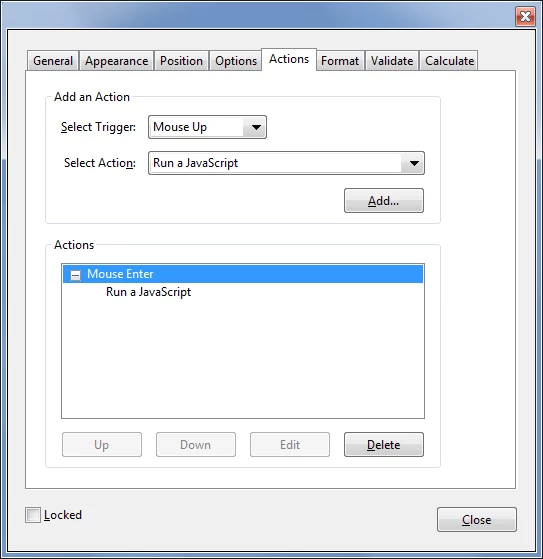
After I click OK to get out of the Java Script Editor, the trigger changes to Mouse Up.

Why isn't the Mouse Enter trigger being excepted?
This topic has been closed for replies.
Correct answer try67

It just defaults back to the first values in the drop-down. The important thing is that your action was added to the Actions list at the bottom of the dialog. If there it says "Mouse Enter" then that's what you added... It should look like this:

1 reply

try67
Community Expert
try67Community ExpertCorrect answer
Community Expert
April 11, 2017

It just defaults back to the first values in the drop-down. The important thing is that your action was added to the Actions list at the bottom of the dialog. If there it says "Mouse Enter" then that's what you added... It should look like this:

Known Participant
April 11, 2017

I see what you mean.  I  wonder why it defaults back like that.  It would make sense to leave the trigger that was selected.

It works now.  Thank you.

Participant
November 9, 2023

Hello Bro. 
can you please tell me hoe you solve it???