Inspiring
March 10, 2022
Question

Move Button From One Page to Another Based on Dropdown Selection

  • March 10, 2022
  • 2 replies
  • 785 views

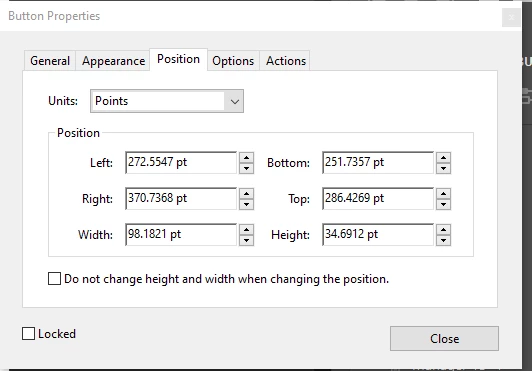
I am needing to figure out how to move the submit button from page 1 to page 2 if options A or B is selected, but remain on page 1 if options C - G are selected. I am having a hard time understsanding how to find the coordinates of the button and do not know how it correlates to the button position. I have reviewed https://www.pdfscripting.com/public/PDF-Page-Coordinates.cfm and still not fully clear how it translates from the below to x,y coordinates. I am very new to Java and learning as I go. Would I need to insert the code into the Custom Format Script for the dropdown menu?


This topic has been closed for replies.

2 replies

Bernd Alheit
Community Expert
Community Expert
March 10, 2022

Use a validation script at the dropdown.

May be better when you create the button on both pages and show/hide the button.

try67
Community Expert
Community Expert
March 10, 2022

You can't move fields from one page to another using a script. The page property is read-only.

What you can do, though, is create two (uniquely named) submit buttons, one on each page, and then show/hide them as needed. To do so you would need to change their display property to either display.visible or display.hidden.

AEJ1215Author
Inspiring
March 10, 2022

I have attempted this, but what happens is if option A or B is selected by mistake and the user actually needed to select option D and changes their selection, the button on page is not hidden. I have page 2 set up as a page template and this is the code I am using:


switch (event.value){


case "LLC":

this.getTemplate("Page_2").spawn(this.numPages, false, false);
this.getField("Sumbit_1").display = display.hidden;
break;

case"Single Member LLC":

this.getTemplate("Page_2").spawn(this.numPages, false, false);
this.getField("Sumbit_1").display = display.hidden;
break;

case "Partnership":

this.deletePages(this.numPages-1, this.numPages-1);

break;

case "-Select Ownership-":

this.deletePages(this.numPages-1, this.numPages-1);
break;

case "Sole Proprietor":

this.deletePages(this.numPages-1, this.numPages-1);
break;

case "Government/Public Funds":

this.deletePages(this.numPages-1, this.numPages-1);
break;

case "Corporation":

this.deletePages(this.numPages-1, this.numPages-1);
break;

}

try67
Community Expert
Community Expert
March 10, 2022

I don't quite follow, but before spawning a new page you need to delete the old one that was spawned, if it exists. You can do that by looking at the number of pages in the file. If it's more than the original number, delete the last page, then spawn the new one.