


_AWID_
Inspiring
January 6, 2025
Answered

move toolbar to the bottom

  • January 6, 2025
  • 1 reply
  • 890 views

Hi


I don't know what this bar is actually called, but I would like to move it to the bottom of my Acrobat-Workspace. Is that possible?
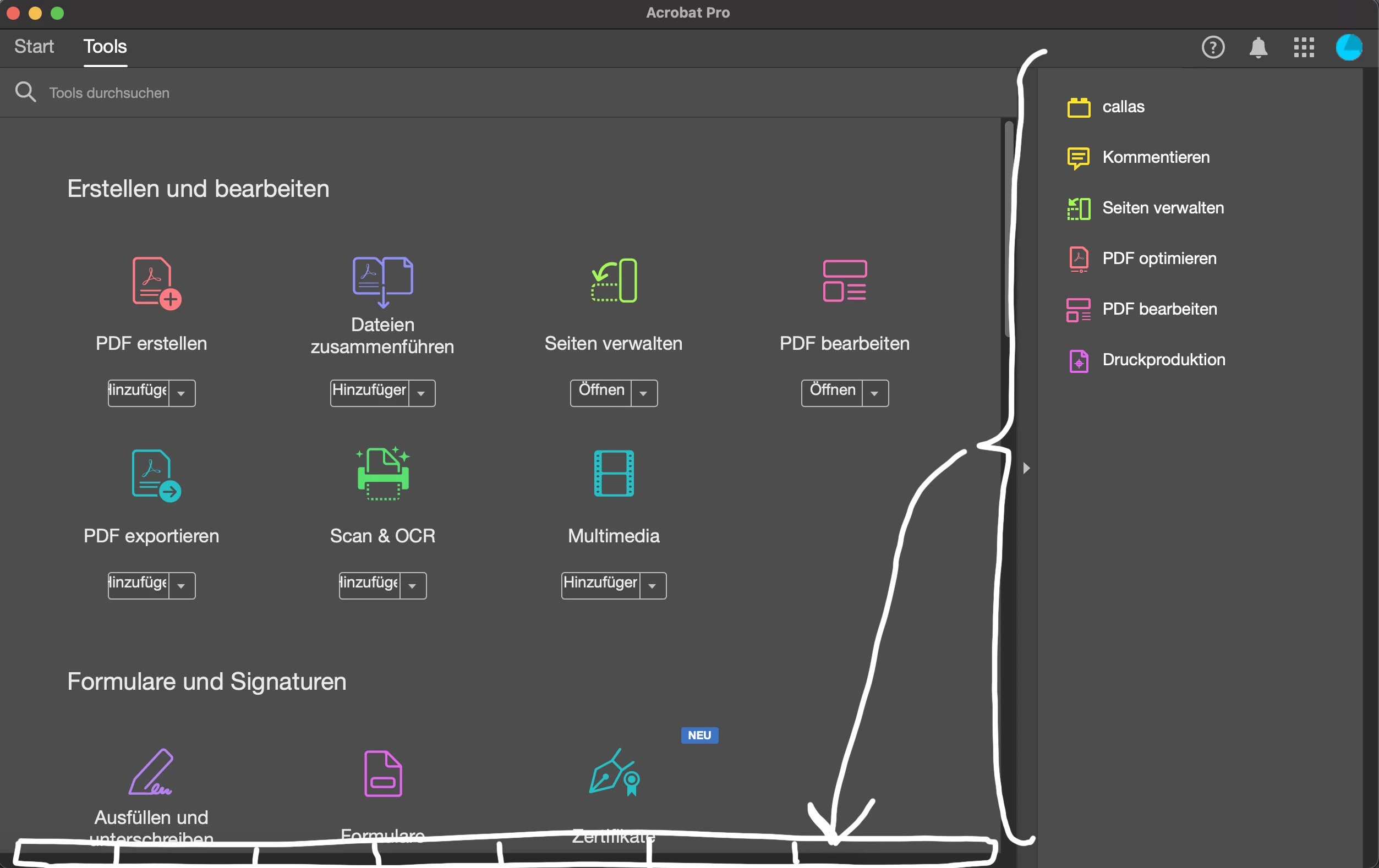


Regards

Correct answer Tariq Dar

Hi @_AWID_


Thanks for reaching out. 
Sadly, it is not possible to move Toolbars in Acrobat. To get more information on workspace, please check this page: https://adobe.ly/4gGVEsQ;

Let us know if you have more questions. 


~Tariq

1 reply

Tariq DarCorrect answer
Legend
January 6, 2025

Hi @_AWID_


Thanks for reaching out. 
Sadly, it is not possible to move Toolbars in Acrobat. To get more information on workspace, please check this page: https://adobe.ly/4gGVEsQ;

Let us know if you have more questions. 


~Tariq

_AWID_
_AWID_Author
Inspiring
January 6, 2025

Thanks for the quick response, Tariq

This is annoying 😞

The problem is: on my second screen I work in portrait mode, so I need the horizontal space for the document and would like to have the comments and tool at the bottom or top. Maybe Adobe could make this adjustment at some point... I think it would be useful for many users, not just me. 😉

Regards

Legend
January 24, 2025

Thank you for sharing your feedback and suggestions! @_AWID_ 


I completely understand how working in portrait mode on a second screen changes the way you need to organize your workspace. Having the option to move the comments and tools to the bottom or top to save horizontal space is an excellent idea, and I agree that it could be helpful for many users with similar setups. 😊


While Adobe Acrobat doesn't currently have this specific customization option as mentioned previously, we encourage you to share your idea directly with our product team by submitting it through the Adobe Wish Form. This is the best way to ensure your feedback is reviewed and considered for future updates. You can submit your request here: Adobe Feature Request/Wish Form.

Your input is valuable to us, and we appreciate you taking the time to help improve our products. If you have any other suggestions or questions, feel free to let us know.

Thanks again!