
Legend
April 26, 2018
Answered

multi-language (tagged) – "Read out loud" only uses one language

  • April 26, 2018
  • 1 reply
  • 1905 views

With some difficulty … I've managed to tag a short .pdf so that the first half of the text is identified as being in English and the second half in French.
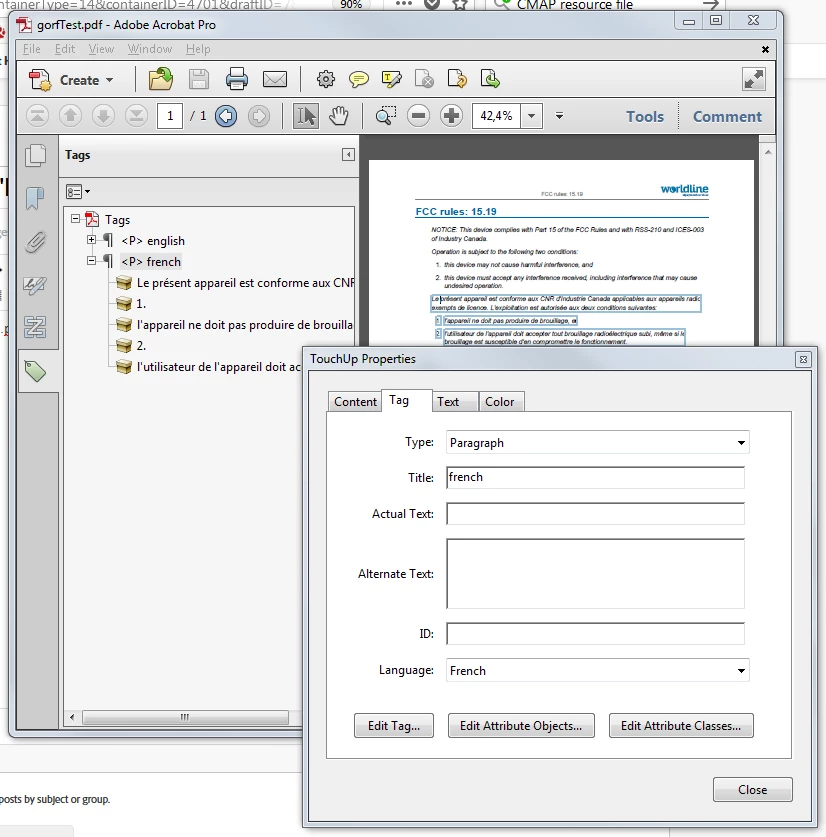
But when I use Read out loud, the entire page is rendered in English :-{ What am I doing wrong?

Subsidiary question: this .pdf is generated from DITA-compliant .xml, with the language attribute set for each element. How come this information is not being used to generate tags for me?

This topic has been closed for replies.
Correct answer olafdruemmer

You will have to make sure for NVDA and any other such technology that you do have the necessary languages installed and activated (there are preferences in NVDA through wich you control which voices are used).

I do know that in principle NVDA does honor language attributes in PDF when used in combination with Acrobat Reader/Acrobat Pro.

On the PDF Association website you can find a PDF/UA Reference Suite (see https://www.pdfa.org/publication/pdfua-reference-suite/  ) which contains a number of well tagged (and PDF/UA conforming) PDFs in different languages. You could play with these to determine whether your setup can in principle handle different languages. The document "PDFUA-Reference-05_(Danish-Learn-Danish).pdf" is bi-lingual and uses both Danish and English, a good candidate to check language/voice switching.

1 reply

Inspiring
April 26, 2018

Read out loud uses the voice that is currently configured in the preferences. Read out loud is not honoring any language attributes.

If you wanted to check out whether widely used assistive technology would pick up the language attribute, use such assistive technology (Read out loud strictly speaking is not assistive technology though still very useful to many). NVDA is a free of charge screen reader for windows - you may want to try your PDF with NVDA (see NV Access  for download and other information).

Note: If you use NVDA and find it useful please do not forget to donate a little bit so they can keep up the good work.

Legend
April 27, 2018

I have already downloaded NVDA, but see no way of telling it that certain portions of a text are in a specific language. I am disappointed that Read out loud is ignoring 'language' information in a correctly-tagged .pdf!

olafdruemmerCorrect answer
Inspiring
April 27, 2018

You will have to make sure for NVDA and any other such technology that you do have the necessary languages installed and activated (there are preferences in NVDA through wich you control which voices are used).

I do know that in principle NVDA does honor language attributes in PDF when used in combination with Acrobat Reader/Acrobat Pro.

On the PDF Association website you can find a PDF/UA Reference Suite (see https://www.pdfa.org/publication/pdfua-reference-suite/  ) which contains a number of well tagged (and PDF/UA conforming) PDFs in different languages. You could play with these to determine whether your setup can in principle handle different languages. The document "PDFUA-Reference-05_(Danish-Learn-Danish).pdf" is bi-lingual and uses both Danish and English, a good candidate to check language/voice switching.