
Inspiring
November 30, 2023
Question

Multiple if statements change field color

  • November 30, 2023
  • 1 reply
  • 852 views

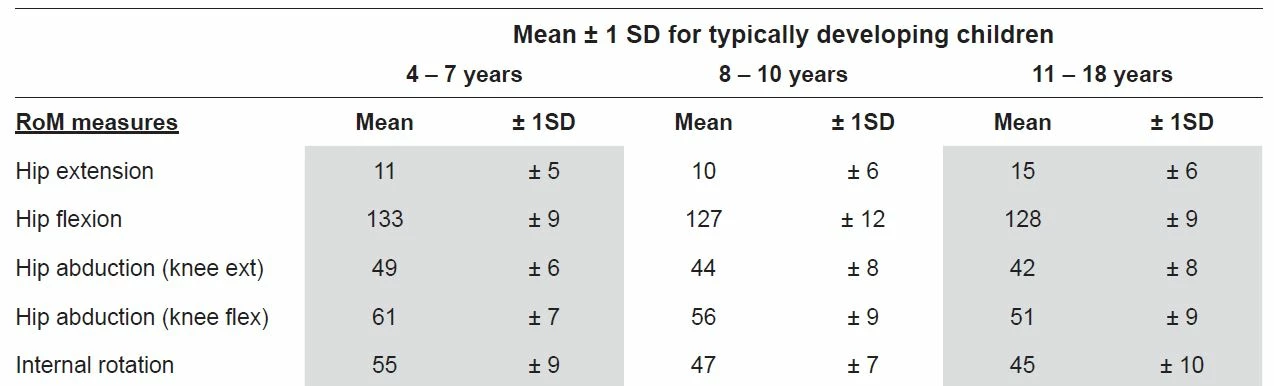
Need help with multiple if statements changing a field color. I already have a calculated age field based on date of birth and date of assessment. First condition is if this is within an age range e.g. 4-7; second condition is if a number is entered in a field that is equal to or more/less than a value for that age range, the field will change color. I have included an image below to hopefully give an idea of how the values change based on the initial age range. Hope this makes sense and any help would be great. Thanks
This topic has been closed for replies.

1 reply

Nesa Nurani
Community Expert
Community Expert
November 30, 2023

Here is a basic script how to change field value depended on 'Age' field value range, you would use this in field where you want to change color as custom calculation script:

var age = Number(this.getField("Age").valueAsString);

if(age >=4 && age <=7)
event.target.fillColor = color.blue;

else if(age >= 8 && age <= 10)
event.target.fillColor = color.green;
try67
Community Expert
Community Expert
November 30, 2023

It's always recommended to set a default value in such calculations, just in case the value is not within the specified ranges of your if-conditions. It can be done by adding a line before the conditions, or to add a final else-clause at the end.