

Tutorllini
Participant
August 2, 2024
Answered

multiple JPGs to PDF => JPGs all have same dimensions but are sized different upon reading

  • August 2, 2024
  • 1 reply
  • 627 views

Hi all,

How do I make it so that my merged PDF (comprised of all 1920x1080 JPGs) all have the same page size when reading the PDF?

See attached file (page 5 for example).

Thanks so much!


This topic has been closed for replies.
Correct answer try67

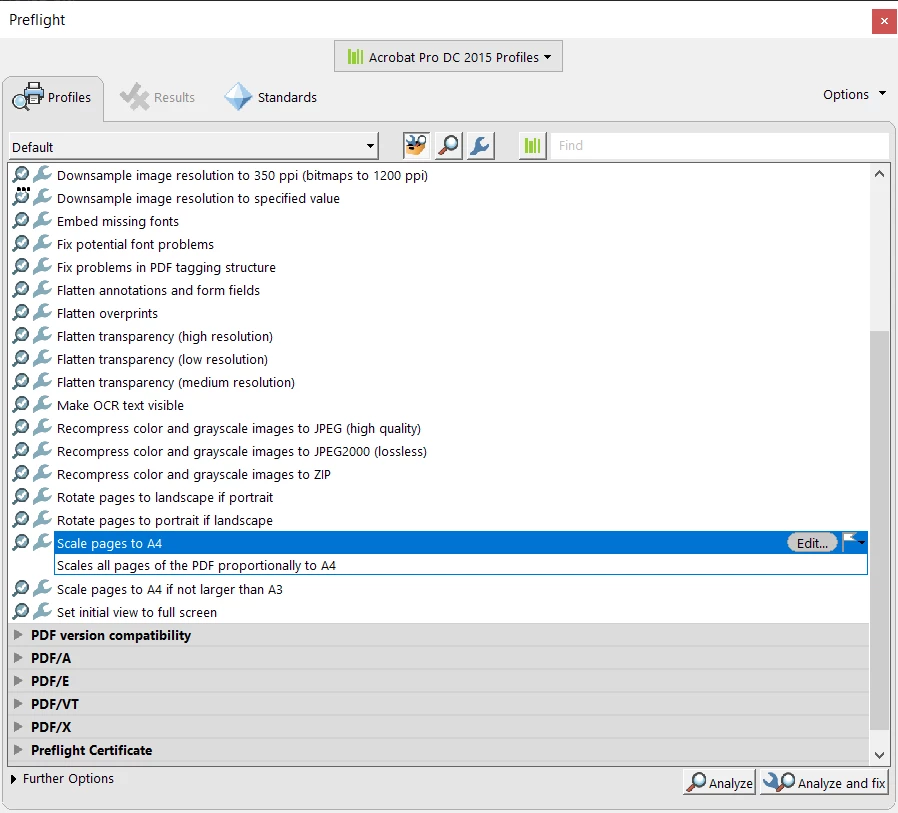
You can use the Preflight tool to scale all the pages to the same size. For example:


The original JPEG images were probably not the same size, by the way.


1 reply

try67
Community Expert
try67Community ExpertCorrect answer
Community Expert
August 2, 2024

You can use the Preflight tool to scale all the pages to the same size. For example:


The original JPEG images were probably not the same size, by the way.


Tutorllini
Participant
August 2, 2024

Thanks! I was looking for that option. I figured out the issue - the images had the same dimensions (but different DPI) so that affected the merging. Appreciate it!