Participant
December 19, 2017
Answered

Multiple print keeping original actual size

  • December 19, 2017
  • 1 reply
  • 6759 views

Is it possible to print multiple A4 pages (let's say 7) on a single customized plotter sheet (or a given A1 sheet) KEEPING the ACTUAL size of the original A4 pages?

This topic has been closed for replies.
Correct answer Abambo

Yes, it is possible but...

You would need an imposition program (quite expensive and used in print shops to impose your prints correctly...) or at least Illustrator or Indesign to place your pages.

In Illustrator/Indesign you create a page of the size you want and you place your PDF pages like graphics on that page. You then export (Indesign) or save (Illustrator) as a new PDF.

If you have only Acrobat, you would need to calculate your page size to fit your data so that your data is not scaled (as fit to available size is default). You need then to print that custom size sheet...
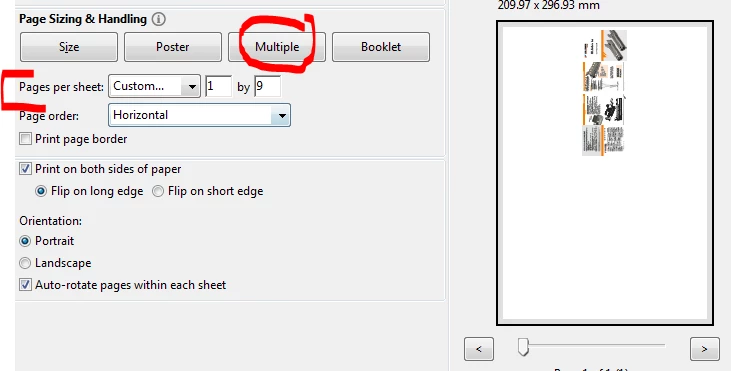
Your possibilities to adjust your data are quite limited.

1 reply

Abambo
Community Expert
AbamboCommunity ExpertCorrect answer
Community Expert
December 19, 2017

Yes, it is possible but...

You would need an imposition program (quite expensive and used in print shops to impose your prints correctly...) or at least Illustrator or Indesign to place your pages.

In Illustrator/Indesign you create a page of the size you want and you place your PDF pages like graphics on that page. You then export (Indesign) or save (Illustrator) as a new PDF.

If you have only Acrobat, you would need to calculate your page size to fit your data so that your data is not scaled (as fit to available size is default). You need then to print that custom size sheet...

Your possibilities to adjust your data are quite limited.

ABAMBO | Hard- and Software Engineer | Photographer
Participant
December 19, 2017

Thank you Abambo.

That's what I was afraid of.

It's a "yes" with a huge BUT so it actually is a "no".

The workaround calculation is nearly impossible because Acrobat puts some additional space between pages (you can see it if you print page border).

Abambo
Community Expert
Community Expert
December 20, 2017

The only really workable way is via Indesign/Illustrator. The pages per sheet trick will do, but only on a trial and error base. And you risk with the next upgrade needing to change the parameters.

What is missing is an easy imposition plug-in that is not to expensive. As said those programs are normally quite expensive as their potential is limited.

As a Creative Cloud user, I have both Indesign and Illustrator at my disposal, so I would do it there.

ABAMBO | Hard- and Software Engineer | Photographer