
Participant
August 21, 2024
Question

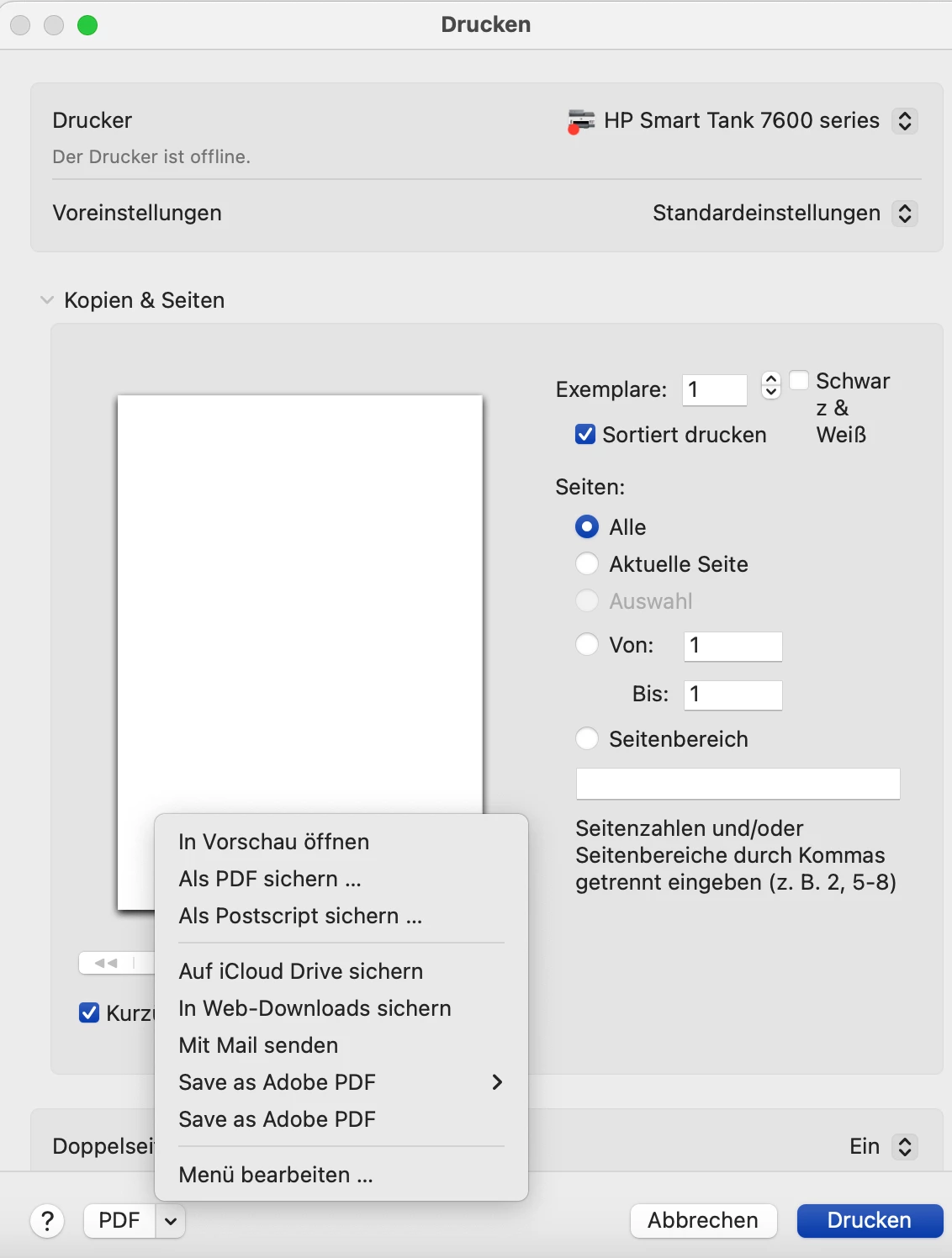
Multiple “Save as Adobe PDF” Entries in Print Settings After Reinstalling Adobe Acrobat

  • August 21, 2024
  • 1 reply
  • 180 views

Hi everyone! After reinstalling Adobe Acrobat on my macOS, I’ve noticed that the “Save as Adobe PDF” option now appears multiple times in the print settings (at the bottom left). Does anyone know how to remove the redundant entries? Is there a shortcut in the user library that I can delete to fix this?


Thank you!
1 reply

Souvik Sadhu
Community Manager
Community Manager
January 20, 2025

Hi @Marcel22458811g6p5,


Hope you are doing well. Thanks for writing in!


These are two variants for the menu, where one allows you to use the standard PDF option, while the other allows you more advanced options for the PDF creation.


Please feel free to share your feedback here: https://adobe.ly/3CfConc to ensure it reaches the dev team for review and future implementation.


-Souvik