


Participant
March 14, 2025
Question

Multiple users having issues with Combine Files

  • March 14, 2025
  • 7 replies
  • 1753 views

We have a number of users who are having issues combining files.  What happens is after choosing the Combine button after adding the files, Adobe Acrobat locks up and says Not Responding.  This is happening randomly and only with certain documents.


One thing I have noticed is it appears to be isolated to PDF files that only have this font in the Fonts tab of the document's Properties.  If I try to combine file that have other fonts, they seem to work correctly.
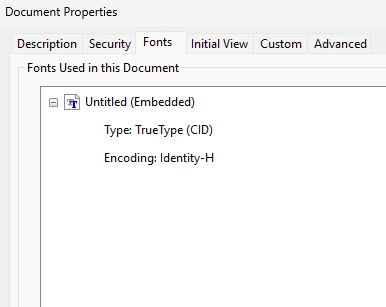
 

This also seems to be a new issue this week and I know a new Adobe version was pushed out on Tuesday.  I don't have a way to roll back that I can tell but it's possible the new version has a bug.  Anyone else having issues?

7 replies

Adobe Employee
April 9, 2026

Hi ​@Swenny_27,

Just checking in—are you still able to reproduce the issue on the latest version of Acrobat?

Could you please ensure your Acrobat is up to date by following these steps:

  1. Open Adobe Acrobat or Acrobat Reader
  2. Click on Help (or Menu ≡ → Help in newer versions)
  3. Select Check for Updates
  4. If an update is available, click Download and Install, then follow the prompts

Once updated, please try reproducing the issue again and share your findings here.

Thank you!

Adobe Employee
October 10, 2025

Hi @Swenny_27 ,

Thanks for reporting this issue. To help us investigate further, could you please provide the following details?

  1. Adobe Acrobat version (Help > About Adobe Acrobat)
  2. Operating System (Windows version)
  3. Exact steps to reproduce the issue (a video would be helpful, if possible)
  4. Does this happen with all PDFs using that specific font, or only certain ones?
  5. Sample PDFs that consistently trigger the issue (please share if possible)
  6. When Acrobat becomes unresponsive, does it eventually show an error, or does it remain in the "Not Responding" state indefinitely?

Looking forward to your response!

Participant
September 29, 2025

I'm having issues with combining doucments after hitting the Combine button, it thinks forever with just a pimch left to complete and when I hit refresh it makes me start all over again. Anyone else experiencing this?


Adobe Employee
October 10, 2025

Hi @lola_8519 ,

Thanks for reporting this issue. To help us investigate further, could you please provide the following details?

  1. Adobe Acrobat version (Help > About Adobe Acrobat)
  2. Operating System (Windows version)
  3. Exact steps to reproduce the issue (a video would be helpful, if possible)
  4. Does this happen with all PDFs using that specific font, or only certain ones?
  5. Sample PDFs that consistently trigger the issue (please share if possible)
  6. When Acrobat becomes unresponsive, does it eventually show an error, or does it remain in the "Not Responding" state indefinitely?

Looking forward to your response!

Participant
May 20, 2025

I have been having this issue last week and this week. A fix would be greatly appreciated as this is a function I use all the time at work. 

Adobe Employee
October 10, 2025

Hi @erin_7789 ,

Thanks for reporting this issue. To help us investigate further, could you please provide the following details?

  1. Adobe Acrobat version (Help > About Adobe Acrobat)
  2. Operating System (Windows version)
  3. Exact steps to reproduce the issue (a video would be helpful, if possible)
  4. Does this happen with all PDFs using that specific font, or only certain ones?
  5. Sample PDFs that consistently trigger the issue (please share if possible)
  6. When Acrobat becomes unresponsive, does it eventually show an error, or does it remain in the "Not Responding" state indefinitely?

Looking forward to your response!

Adobe Employee
March 26, 2025

Hi @Swenny_27 ,

Thanks for reporting this issue. To help us investigate further, could you please provide the following details?

  1. Adobe Acrobat version (Help > About Adobe Acrobat)
  2. Operating System (Windows version)
  3. Exact steps to reproduce the issue (a video would be helpful, if possible)
  4. Does this happen with all PDFs using that specific font, or only certain ones?
  5. Sample PDFs that consistently trigger the issue (please share if possible)
  6. When Acrobat becomes unresponsive, does it eventually show an error, or does it remain in the "Not Responding" state indefinitely?

Looking forward to your response!

Legend
March 17, 2025

Hi @Swenny_27 


Sorry for the troubled experience, and thank you for reaching out. 


My observation is based on what you have described. 


  1.  If your system creates PDF files with that identified font, check if you have the right to embed the font. 
  2.  Check if the individual files have the font embedded properly
  3.  Before combing the files try using the Preflight tool to fix font issues and then try combining.


Let us know how it works. 


Also, as @creative explorer suggested this issue isn't reproducible in-house. 


~Tariq

Swenny_27Author
Participant
March 17, 2025

Thanks all for your replies and for informing me about Preflight.  I compared a problem PDF to one that works correctly.  Preflight showed these two errors on the problem PDFs

Does this help with troubleshooting?  Anything I can try as a workaround?  Thanks!

Adobe Employee
November 7, 2025

Hi @Swenny_27,

Are you still experiencing this issue with the latest version of Acrobat?
If possible, could you please share a few sample PDFs that consistently reproduce the issue? This will help us investigate further.


Looking forward to your response!

creative explorer
Community Expert
Community Expert
March 17, 2025

@Swenny_27 I was teaching a class with students and we were combining files left and right and out of class of 40 students, we didn't have any issues. We were using files that were created from MAC and PCs. 

m