


Participant
February 7, 2025
Question

Multiples sessions actives

  • February 7, 2025
  • 1 reply
  • 500 views

Bonjour,


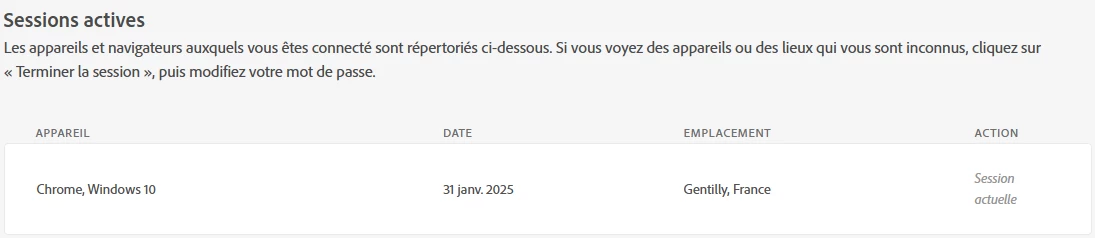
Sans ouvrir l'application Acrobat, la section 'Sessions actives' de https://account.adobe.com/security me présente cela:
 

Une fois l'application Acrobat lancée (double click sur l'icone ou ouverture d'un PDF), 2 nouvelles sessions actives apparaissent: 
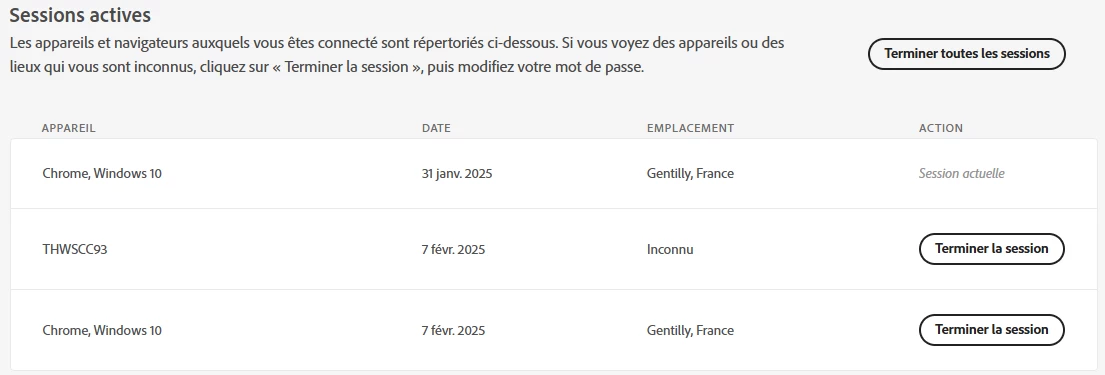
 

Dans ces conditions, lorsqu'un 2eme ordinateur souhaite utiliser Acrobat, il n'y arrive pas, le nombre de sessions actives étant trop important. 


Cette situation a démarré le 31 janvier dernier, comme on peut le constater au niveau de la date de la 'Session actuelle' (qu'il est impossible de terminer). 


Sauriez-vous ce que sont ces 2 sessions "Chrome, Windows 10" ? Je n'ai pas de plugin Adobe sur mon navigateur Chrome, mon PC tourne sous Windows 11 et je ne suis pas sur Gentilly (mais pas très loin cependant). 


Merci par avance,


Vivien

1 reply

Amal.
Legend
February 7, 2025

Hi there,

I hope you're doing well! Thanks for reaching out.

Could you let us know what exactly happens when you click on "Complete all sessions"? Are you seeing any error messages, or is nothing happening?

If you suspect that your account might be compromised, I recommend the following steps:

  1. Click on "Complete all sessions" to log out of all active devices.
  2. Sign out of your account.
  3. Change your Adobe password to a new, strong password.

Please try these steps and let us know if you’re able to resolve the issue


Additionaly for future reference and self-help please check the help page https://helpx.adobe.com/acrobat/faq.html


Participant
February 8, 2025

Hi Amal,


Thank you for your reply. The account is only shared with me and a friend. We did some testing and she's experiencing the same situation:  1 "Chrome, Windows" active session before opening Acrobat then, once opened, 3 active sessions (1 properly referencing her PC iD, and 2 identical "Chrome, Windows" sessions).


Furthermore, the "Gentilly" location appears to correspond to my location..with a lack of accuracy, since the locations of my friend Chrome sessions matches her actual location.


So we concluded that these Chrome sessions are not unauthorized sessions but additional sessions linked to our PC sessions.


The problem is that, for both of us, we can no longer use Acrobat at the same time since one connection now creates 3 active sessions.. ! 


Note that this situation has started last week. We both deleted Chrome Adobe plug in even if it was not activated. It did not solve the issue. 


I'm interested in any tips to try 🙂


Have a great weekend,


Vivien

Participant
February 13, 2025

So, forget the information about the Adobe account installed on 2 computers. 


The scenario is the following:

- On https://account.adobe.com/security I close all the active sessions.

- I reboot my computer then launch the Acrobat app. The app opens and asks for a login. I log. It works I can read PDF

- Then I close the Acrobat. 

- I try to reopen Acrobat either by clicking on the app or on a pdf file. It fails. Nothing happens and I eventually get this message:

- I go on https://account.adobe.com/security and have this:


Terminating the sessions does not solve the issue unless I reboot my computer, launch the app and log again. 


Any ideas to fix this conflict ? 


Thanks !