Participant
April 20, 2023
Question

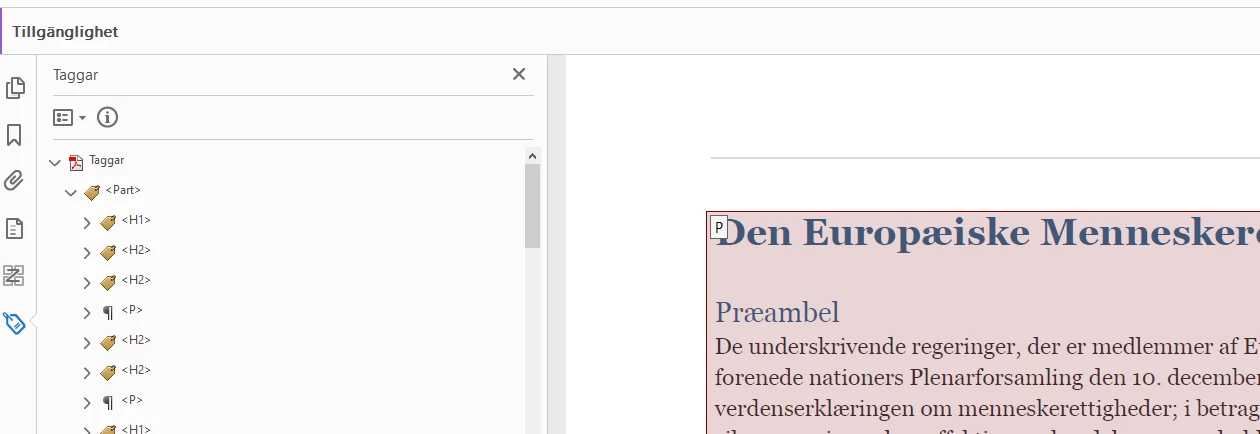
My tagtree doesnt agree with reading order?

  • April 20, 2023
  • 1 reply
  • 3123 views

I am wondering if recent update made any changes that make my acrobat reading order to become faulty.
 

1 reply

Bevi Chagnon - PubCom.com
Legend
April 20, 2023

Your preferences for how to view the Order panel were changed. Reset them:

  1. From the Order panel's drop-down menu (the square menu next to the circled I), UNcheck the option to Display Like Elements in a Single Box.
  2. Then, choose how you want to view the items on the right side: from the drop-down menu, choose either:
    Show Page Content Groups: Page Content Order (numbered), or
    — Structure Types (what you see now in your screen capture).


|    Bevi Chagnon   |  Designer, Trainer, & Technologist for Accessible Documents ||    PubCom |    Classes & Books for Accessible InDesign, PDFs & MS Office |
Participant
April 20, 2023

Let me rephrase that. The tags tree structure type doesnt is the same as the structure type in the reading order.... a <H1> in the tag tree is a <P> in the reading order?


Bevi Chagnon - PubCom.com
Legend
April 20, 2023

You're seeing a long-standing bug in the Order panel — It doesn't show the elements with their correct tags.


Follow the instructions above and change how the Order panel displays the information. Avoid showing content types because that's where the bug creeps in.


|&nbsp;&nbsp;&nbsp;&nbsp;Bevi Chagnon &nbsp;&nbsp;|&nbsp;&nbsp;Designer, Trainer, &amp; Technologist for Accessible Documents ||&nbsp;&nbsp;&nbsp;&nbsp;PubCom |&nbsp;&nbsp;&nbsp;&nbsp;Classes &amp; Books for Accessible InDesign, PDFs &amp; MS Office |