
Participant
May 24, 2021
Question

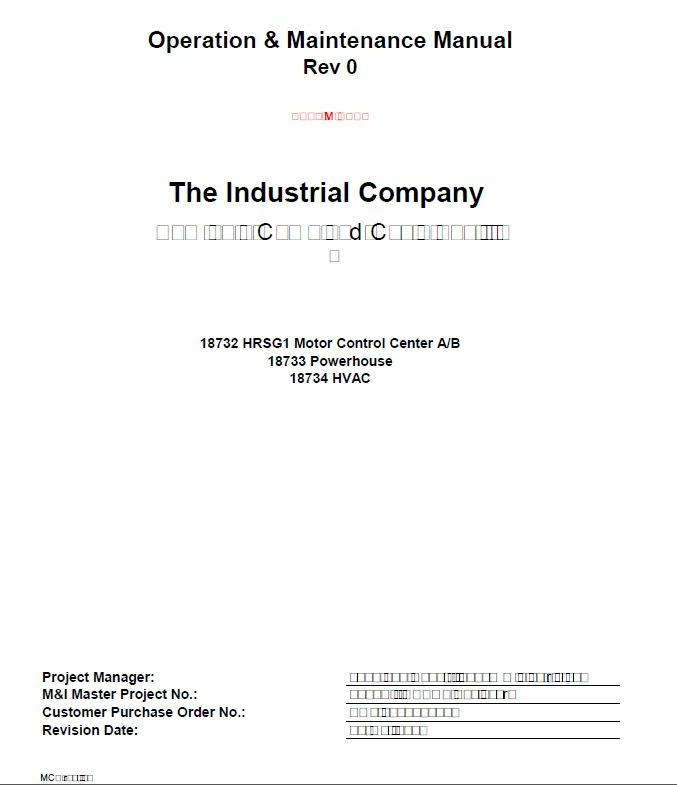
My text has changed to boxes within my entire manual.

  • May 24, 2021
  • 1 reply
  • 365 views

I have adobe pro and I put together manuals for the company I work for. This issue has happened before and I ended up redoing the entire manual I was creating. It never seems to be anything particular that triggers this issue and it only randomly happens from time to time when saving the file.
 

This topic has been closed for replies.

1 reply

Amal.
Legend
May 25, 2021

Hi there


Hope you are doing well and sorry for the trouble. As described the text in the PDF file changes to square boxes.


Have you created this PDF or have you got it from a different user?


It seems to be the font issue, as if the fonts are not properly embedded into the PDF file or they are not present on your computer system.  Please open the PDF file and go to Edit (Win), Adobe Acrobat (Mac) > Preferences > Page Display > Under Rendering select 'Use Local Fonts' Click OK and check if that helps.


If it doesn't,  go to Tools >  Print Production > Preflight > Under Profiles select 'List potential font problems' > Analyse and fix.


Note: A font can be embedded only if it contains a setting by the font vendor that permits it to be embedded.

For more information about font embedding please check the help page https://helpx.adobe.com/acrobat/using/pdf-fonts.html


Regards

Amal