Participant
March 26, 2024
Answered

Não consigo realizar a assinatura digital

  • March 26, 2024
  • 3 replies
  • 1248 views

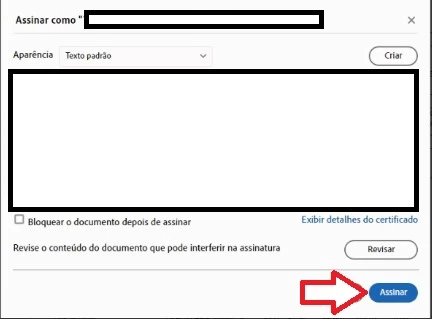
Bom dia um problema recorrente que tem acontecido comigo foi na parte de confirmar a assinatura o mesmo não assina e voltar para a mesma tela não importa quantas vezes eu cliquei em assinar

Já desinstalei e removi os arquivos locais e mesmo assim o problema retorna.

Correct answer AnandSri

As empresas que trabalho emito documento em word e gravo em pdf, e fazia assinatura manuscrita digital de minha assinatura (assinei uma folha sulfite escanieie e gravei no portal Adobe Acrobat Pro que pago já tem mais de um ano), e gero o Certificado Digital aquele com números e a letra rosa de Certificado A1 no fundo da imagem, acontece que todos os documentos assinados com a minha assinatura estelizada pelo Adobe Acrobat Pro sumiram e os meus clientes estão reclamando que só aparece o certificado digital minhas assinaturas manuscritas digitalizada sumiram dos documentos que enviei assinadas. Pagava o plano de 95 reais ai puxei o photoshop mas não tive sucesso ele não tira fundo de treliças de aluminio de máquinas de automação e pago mensal 135 reias para que se o Adobe Acrobat free era melhor e não sumiam com minhas assinaturas manuscritas digitalizadas. 


Hello @paulo_8095


I hope you are doing well, and thanks for sharing the details.


The issue occurs where image-based signatures (like scanned handwritten ones) vanish when:

  • The PDF is opened in Acrobat Pro or Reader DC.
  • The document is shared via email or downloaded.
  • The PDF is printed or re-saved using “Print to PDF” or similar workflows

The digital certificate (A1) remains because it’s cryptographically embedded, but the visual appearance (your scanned signature) may be lost due to:

  • Signature field settings.
  • PDF rendering issues.
  • Compatibility problems with certain Acrobat versions.

Solution: 

  1. Update Acrobat Pro
    Ensure you're using the latest version. Go to Menu > Help> Check for Updates, install the updates, restart the app and the machine, and try again.

  2. Enable Signature Appearance
    In Acrobat:

    • Go to Menu > View > Show/Hide > Navigation Panes > Signatures.
    • Check if your signature image appears there.
  3. Avoid “Print to PDF”
    This action removes digital signatures. Instead, use Save As or Export PDF.

Use Adobe Sign for Sharing
Share signed PDFs using Acrobat’s built-in sharing tools:

    • Click Share in the top-right corner.
    • Follow the prompts to send securely. Test in Browser. Open the signed PDF in Chrome or Edge to verify if the signature image appears.

Recreate Signature Appearance
If your image signature was saved as a stamp or appearance:

    • Go to Preferences > Signatures > Appearance > New.
    • Re-upload your scanned signature and save it as a new appearance.

See these articles for more details: https://adobe.ly/4ltUDG7

https://adobe.ly/4lLM4qt


Thanks,

Anand Sri.

3 replies

Known Participant
September 19, 2025

Please, I dont speak english, I live in Brazil I speak portuguese. Your message is bad

Known Participant
September 19, 2025

I subscribe to a software service to make things easier, not more complicated. I subscribe to Adobe Acrobat Pro, and every time something comes up that hinders my work. In other words, I don't want to learn anything, and they force me to use Adobe to learn. If I pay for a service, it has to be the full service. If the Adobe platform provides a service that doesn't serve me, I'll have to cancel my subscription and migrate to a platform that honors its service. Now they come saying that my PDF files are incompatible! Damn! I always have to open them for digital signatures as a disabled PDF. This has to be a joke? I pay for the full product, not half-baked goods. Please put yourself in your place. I don't want to learn anything, just sign my PDF documents like I did when I had Adobe Acrobat free. Now I pay for it, and they're hindering my work. This is a crime against the nation. To be harassed while paying for a product.

AnandSri
Legend
September 19, 2025

Hello @paulo_8095


I hope you are doing well, and I am sorry for the trouble.


Have you tried the suggestions shared in the above response and the new community thread you started? If not, please try once and let us know if that doesn't work.

If you wish, I can get a callback arranged from the technical support team so that they can assist you with the troubleshooting. You can share the callback details, best time to reach out, and the timezone in direct message. Please click on my community profile name, and choose message.

Note: Please don't share any personal information on the public community post.


Thanks,

Anand Sri.

Known Participant
May 22, 2025

Tive que desistalar este programa e pagando mensalidade me tiraram meu direito de uso e não consigo assinar documentos para empresas, seis tão de brincadeira.

AnandSri
Legend
June 18, 2025

Hello @paulo_8095


I hope you are doing well. We are sorry for the trouble and for the delayed response.


Could you please share more details about the issue? Are you not able to sign all the PDFs, or is it specific to one? Are you on a Mac or Windows machine, and what is the version? Are you using Acrobat Pro or the freeware Acrobat Reader desktop app to use the Digital signature


Please ensure you have the latest version of Acrobat installed on the machine: 25.001.20531 (Win) | 25.001.20529 (Mac), planned update June 10, 2025. Check for any pending updates from the Menu > help > check for updates, install the updates, restart the app and the machine, and try again.


Make Sure You’re Signed In with the Right Account. Open Acrobat. Go to Menu > Help > Sign In. Use the same email address linked to your paid subscription.

Re-enable Digital Signature Tools. Go to All Tools > Certificates. If the Certificates tool isn’t visible, click More Tools and add it. Try signing the document again using Certificates > Digitally Sign.


Restore Your Digital ID (if applicable). If you previously used a digital certificate stored on your device, you may need to re-import it: Go to Menu > Preferences > Signatures > Identities & Trusted Certificates. Click Add ID and follow the prompts to import your certificate.


Let us know how it goes after trying these steps. We're here to help; we just need more info.

Thanks,

Anand Sri.

Known Participant
August 13, 2025

As empresas que trabalho emito documento em word e gravo em pdf, e fazia assinatura manuscrita digital de minha assinatura (assinei uma folha sulfite escanieie e gravei no portal Adobe Acrobat Pro que pago já tem mais de um ano), e gero o Certificado Digital aquele com números e a letra rosa de Certificado A1 no fundo da imagem, acontece que todos os documentos assinados com a minha assinatura estelizada pelo Adobe Acrobat Pro sumiram e os meus clientes estão reclamando que só aparece o certificado digital minhas assinaturas manuscritas digitalizada sumiram dos documentos que enviei assinadas. Pagava o plano de 95 reais ai puxei o photoshop mas não tive sucesso ele não tira fundo de treliças de aluminio de máquinas de automação e pago mensal 135 reias para que se o Adobe Acrobat free era melhor e não sumiam com minhas assinaturas manuscritas digitalizadas. 

Participant
March 26, 2024

Uma correção (  não importa quantas vezes eu cliquei em assinar, ele não assina)