
Participant
October 20, 2021
Answered

Need Help Creating Fillable Form - Using Javascript with List Box and Multiple Selections

  • October 20, 2021
  • 2 replies
  • 1526 views

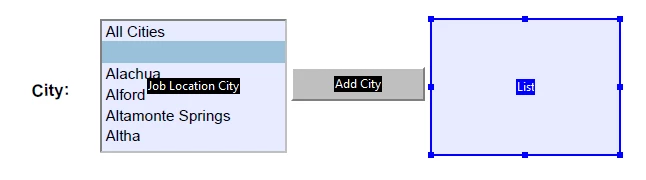
I need help with a form I am creating. I have a "List of Choices" box on my form that has all the Florida Cities. What I am trying to do is, create a button that moves their selection (or selections) to another box. What is the JavaScript for this action? Also, I want to be able to clear the box when the "Clear Form" button is pressed. Is this possible?
This topic has been closed for replies.
Correct answer radzmar

Hi,


gassumed the listbox is names "ListBox" and the text field "TextField" this should do the trick:

var oList = this.getField("ListBox"),
    oField = this.getField("TextField"),
    aSelection = oList.currentValueIndices,
    cOutput = "";
if (typeof aSelection == "number") {
    cOutput += "\n" + oList.getItemAt(aSelection, false);
} else {
    for (var i = 0; i < aSelection.length; i ++) {
        cOutput += "\n" + oList.getItemAt(aSelection[i], false);
    }
}
oField.value = cOutput;


2 replies

try67
Community Expert
Community Expert
October 20, 2021

You can access the field's value using the value property. Note it will return an Array if multiple items are selected, or a String if only one item. You can then use the insertItemAt method to add new items to the other field. You might want to make sure those items aren't already there, though.

To clear the list of items you can use the clearItems method.

radzmar
Community Expert
radzmarCommunity ExpertCorrect answer
Community Expert
October 20, 2021

Hi,


gassumed the listbox is names "ListBox" and the text field "TextField" this should do the trick:

var oList = this.getField("ListBox"),
    oField = this.getField("TextField"),
    aSelection = oList.currentValueIndices,
    cOutput = "";
if (typeof aSelection == "number") {
    cOutput += "\n" + oList.getItemAt(aSelection, false);
} else {
    for (var i = 0; i < aSelection.length; i ++) {
        cOutput += "\n" + oList.getItemAt(aSelection[i], false);
    }
}
oField.value = cOutput;


ShanC2915Author
Participant
October 21, 2021

I placed the JavaScript into the "Text Box" under the actions tab, and if you press the "Add" button it does move it from the "List Box" to the "Text Box". However, if you select multiple cities and press "Add"  they appear all crammed together in the "Text Box". Is there a way I can fix this?

try67
Community Expert
Community Expert
October 21, 2021

Did you set the text field as Multiline?