
paulasolar
Participating Frequently
May 10, 2019
Answered

Need Help in Creating a Custom Calculation Script [no JavaScript experience]

  • May 10, 2019
  • 1 reply
  • 1285 views

I need help in creating a custom calculation script using JavaScript.  I have zero experience with JavaScript so this is all very brand new to me.

I converted an Excel form to a fillable PDF.

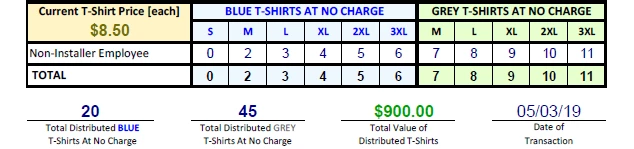
I have a PRICE field, TOTAL DISTRIBUTED BLUE T-SHIRTS field, TOTAL DISTRIBUTED GREY T-SHIRTS field and a TOTAL VALUE OF DISTRIBUTED T-SHIRTS field.

The PRICE field is fixed as $8.50 [this field is read only].

The TOTAL DISTRIBUTED BLUE T-SHIRTS field is calculated based off of the total combined quantities entered for sizes S, M, L, XL, 2XL and 3XL.

The TOTAL DISTRIBUTED GREY T-SHIRTS field is calculated based off of the total combined quantities entered for sizes M, L, XL, 2XL and 3XL [no S offered in grey].

The TOTAL VALUE OF DISTRIBUTED T-SHIRTS field should be the sum of the TOTAL DIST'B BLUE + TOTAL DIST'B GREY x $8.50.

Adobe offers a Sum , Product , Average, Minimum & Maximum only or entering a calculation written in JavaScript.

Shown below, the $900.00 is a simple calculation of 20 x 45.  However, I need the end result to show a total of 65 [20+45] t-shirts times $8.50 each for a total value of $552.50.
This topic has been closed for replies.
Correct answer Thom Parker

Here's a tutorial on writing calculations

https://acrobatusers.com/tutorials/how-to-do-not-so-simple-form-calculations

Since you don't have any conditionals you can do most of what you want with Simplified Field Notation. But you'll need to change your field names to conform to the rules, which are outlined in the article.

1 reply

Thom Parker
Community Expert
Thom ParkerCommunity ExpertCorrect answer
Community Expert
May 10, 2019

Here's a tutorial on writing calculations

https://acrobatusers.com/tutorials/how-to-do-not-so-simple-form-calculations

Since you don't have any conditionals you can do most of what you want with Simplified Field Notation. But you'll need to change your field names to conform to the rules, which are outlined in the article.

Thom Parker - Software Developer at PDFScriptingUse the Acrobat JavaScript Reference early and often
paulasolar
Participating Frequently
May 10, 2019

Thom,

Thank you for the great help!!!  It worked.  I simplified the field names to A [Ttl Blue shirts], B [Ttl Grey shirts], C [price] and D [Ttl value].

I used the Simplified Field Notation by entering (A+B)*C and it worked.  However, I've noticed this before on other forms using a "Value is a Sum " where the display in the field with the calculation doesn't 'catch up' so to speak when it is adding up the quantities.

For example: a User enters a qty of 2 for S, 2 for M and 4 for XL, for a total of 8 blue shirts.  The Total Value [field D] accurately calculates as $68. The User goes back and changes the M qty to 4 for a new combined qty of 10 but the Total Blue Shirts [field A] doesn't update, so the Total Value [field D] remains at $68 when it should now be $85.

This occurs sometimes, but not always, when a User is entering quantities on a blank form or when making changes to quantities.  The lack of updating occurs 80% of the time and if the User doesn't realize it, then they submit a form that does not accurately display the correct quantities per color or an accurate total value.

Can you help me to understand why this is occurring?

Thom Parker
Community Expert
Community Expert
May 11, 2019

Sounds like a calculation order problem.   You can set the order when Acrobat is in "Prepare Form" mode.

Thom Parker - Software Developer at PDFScriptingUse the Acrobat JavaScript Reference early and often