Need help with formula: Calculating subtotals in offers (using Adobe Livecycle Designer)
Hi community,
I'm just trying to create a xdp template for a customer. I am a total beginner when it comes to Adobe. Everything works fine except the subtotal field. It would be great if you could help me out with the right formula. Here's what I got so far...
Table design:
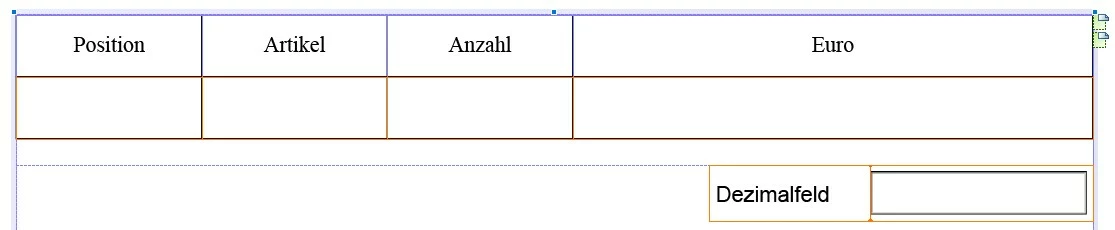
"Euro" field (DecBetragNetto): visible, decimal field, read only, binding works
"Dezimalfeld" field (subtotal field named "Sum"): visible, decimal field, calculated - read only, no data binding
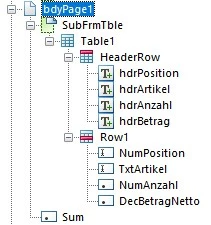
Page structure:
Output:
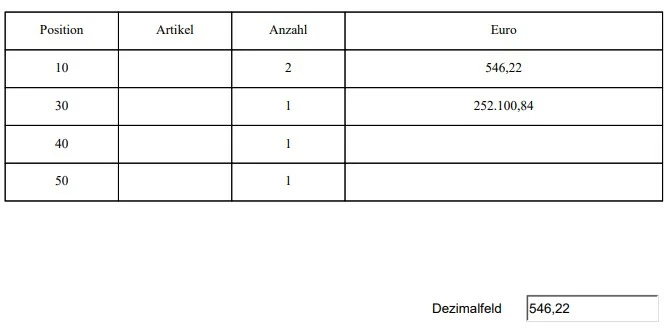
This is just an example output screenshot which calculates the sum of line 1.* I thought that my problem could be solved using Sum(xfa.resolveNode("FormQuoteNotification.bdyPage1.SubFrmTble.Table1.Row1[*].DecBetragNetto[*]")) but the output field stays empty.
Please help.
*Formula: Sum(xfa.resolveNode("FormQuoteNotification.bdyPage1.SubFrmTble.Table1.Row1.DecBetragNetto"))
 AdChoices