Participant
Jan 30, 2025 9:47 PM UTC
Answered

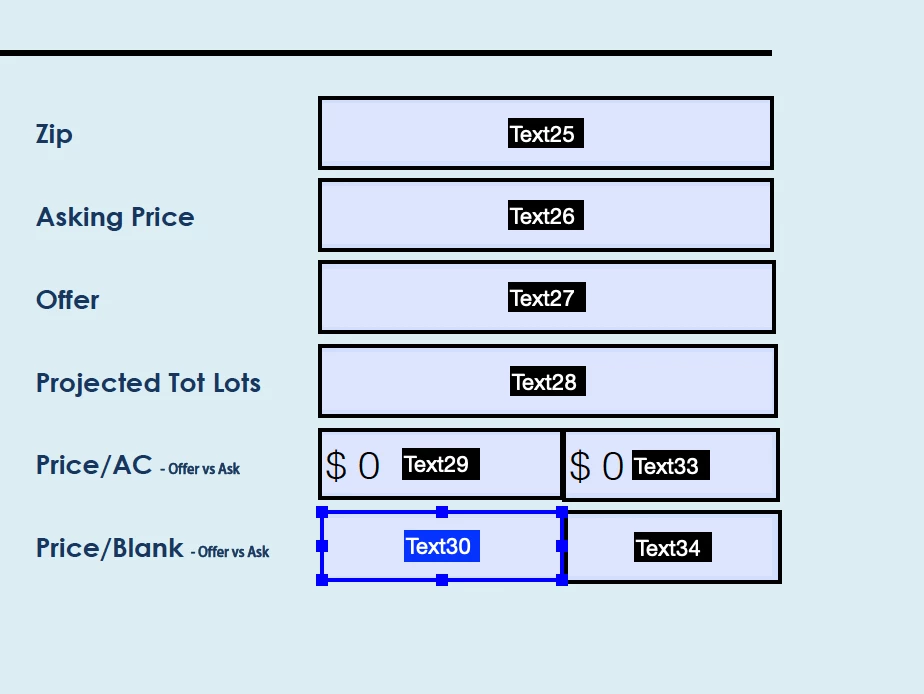
Need Help with Simple Division on Fillable PDF / Java (see image)

Im getting the dreaded "value doesnt match format" pop up.  I have sucessfully created my first fillable PDF but now I need someone to help me with the java


I have never "done" java ... and I am a newbie at best with creating PDFs and adobe.


Here is what I am trying to do.  Its super basic I just dont know anything about Java


example:


Text30 = Text27/Text28


Text29 = Text27/total


Text33 = Text26/total


Text34 = Text26/Text28


I realize the errors are popping up due to my simple formulas having empty blanks that are "seen" as zeros ...


for Text30 = Text27/Text28 I did try this to no avail:


var Text27 = this.getField("Text27").value;

var Text28 = this.getField("Text28").value;


if (Text28 !== 0) {

    event.value = Text27 / Text28;

} else { event.value = "Divsion by zero!"; // Handle the case of division by zero 

}
 

JR Boulay
JR BoulayCorrect answer
Community Expert
Jan 30, 2025 10:38 PM UTC

PDF doesn't support Java, so you'll have to use JavaScript.


var text27 = this.getField("Text27").value;
var text28 = this.getField("Text28").value;
if (text28 != 0 && text28 != "" && text27 != "") {event.value = text27 / text28;}
else {event.value = "";}


Acrobate du PDF, InDesigner et Photoshopographe

4 replies

Thom Parker
Community Expert
Community Expert
Jan 31, 2025 12:23 AM UTC
Thom Parker - Software Developer at PDFScriptingUse the Acrobat JavaScript Reference early and often
JR Boulay
Community Expert
Community Expert
Jan 30, 2025 10:45 PM UTC

"Im getting the dreaded "value doesnt match format" pop up"

This is because you're trying to put the "Divsion by zero!" string in a field that uses the "Number" format.

Translate
Acrobate du PDF, InDesigner et Photoshopographe
JR Boulay
Community Expert
JR BoulayCommunity ExpertCorrect answer
Community Expert
Jan 30, 2025 10:38 PM UTC

PDF doesn't support Java, so you'll have to use JavaScript.


var text27 = this.getField("Text27").value;
var text28 = this.getField("Text28").value;
if (text28 != 0 && text28 != "" && text27 != "") {event.value = text27 / text28;}
else {event.value = "";}


Translate
Acrobate du PDF, InDesigner et Photoshopographe
Participant
Jan 31, 2025 3:07 PM UTC

my mistake.  when I said java I meant javascript.   thanks for the insight to this!  

Translate