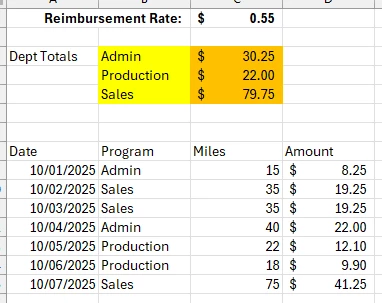
Let's say your three orange total fields are named "Admin", "Production", and "Sales", and your input fields are named "Program1"–"Program7" and "Amount1"–"Amount7".
(Make sure the field names are exactly correct — this part is very important.)
I only see seven fields in your screenshot, but if you have more, simply change the number 7 in the script to match the total number of field pairs you have.
Place the following code in any of your total fields (for example in the “Admin” field) under Custom Calculation Script:
var admin = 0, production = 0, sales = 0;

for( var i=1; i<=7; i++){
 var program = this.getField("Program"+i).valueAsString;
 var amount = Number(this.getField("Amount"+i).valueAsString);

 if(program == "Admin"){
  admin += amount;}
 if(program == "Production"){
  production += amount;}
 if(program == "Sales"){
  sales += amount;}}

this.getField("Admin").value = admin;
this.getField("Production").value = production;
this.getField("Sales").value = sales;
If by this:
“However the department values (in yellow) will change depending on the user. They will change constantly.”
you mean that ‘Admin’, ‘Production’, and ‘Sales’ might change to something else, then yes — you can adjust the script by updating the program names in the code.
Alternatively, if you already know all the possible department names that could appear in the yellow fields, I can include them directly in the script so it handles all of them automatically.





 AdChoices