
jessicaj68929848
Participating Frequently
November 4, 2020
Answered

Need my Calculated field to Round Up

  • November 4, 2020
  • 2 replies
  • 3718 views

Hello! I have absolutely NO experience with JavaScript, but everything I read says I need a script to make my calculated field Round Up. While I understand that, I have not a clue where to put this in, or how I would need to change it to perform the actions I need it to.

I have a form that adds 8 fields up for the Subtotal. One of these fields is multiplied by a number with 6 decimal places. So currently, even though it only shows 2 decimal places, I believe the subtotal is rounding down based on that calculation, and I need it to round up.

If someone can easily provide step-by-step instructions on how to achieve this, including where in Acrobat Pro DC to enter it, I would be so grateful!
This topic has been closed for replies.
Correct answer ls_rbls

So after the calculation, my result ends up as 8291.242923, which is why it keeps rounding down to .24. It's because my UPTV Tax number is multiplied by a number that is 6 decimal places long. The other fields round correctly in their 2 decimal format, and this field IS rounding correctly, but I need it to round up so that the math showing on the paper is correct (xxx.67 + xx.58 = xxx.25 not .24)....ugh, I hope that makes sense. I really appreciate your help today.


I recreated your table, and it worked on my end, but first, You may need to format every field to Number with 2 decimals.


I also will assume the Unity Property Value tax is .001919 since when I add the numbers that you had sahred in your screenshot it calculates a total of $15.58.


In the UPTV Tax field I used the following custom calculated script:


event.value = (this.getField("SUBTOTAL").value+this.getField("SALES TAX").value )*.001919;


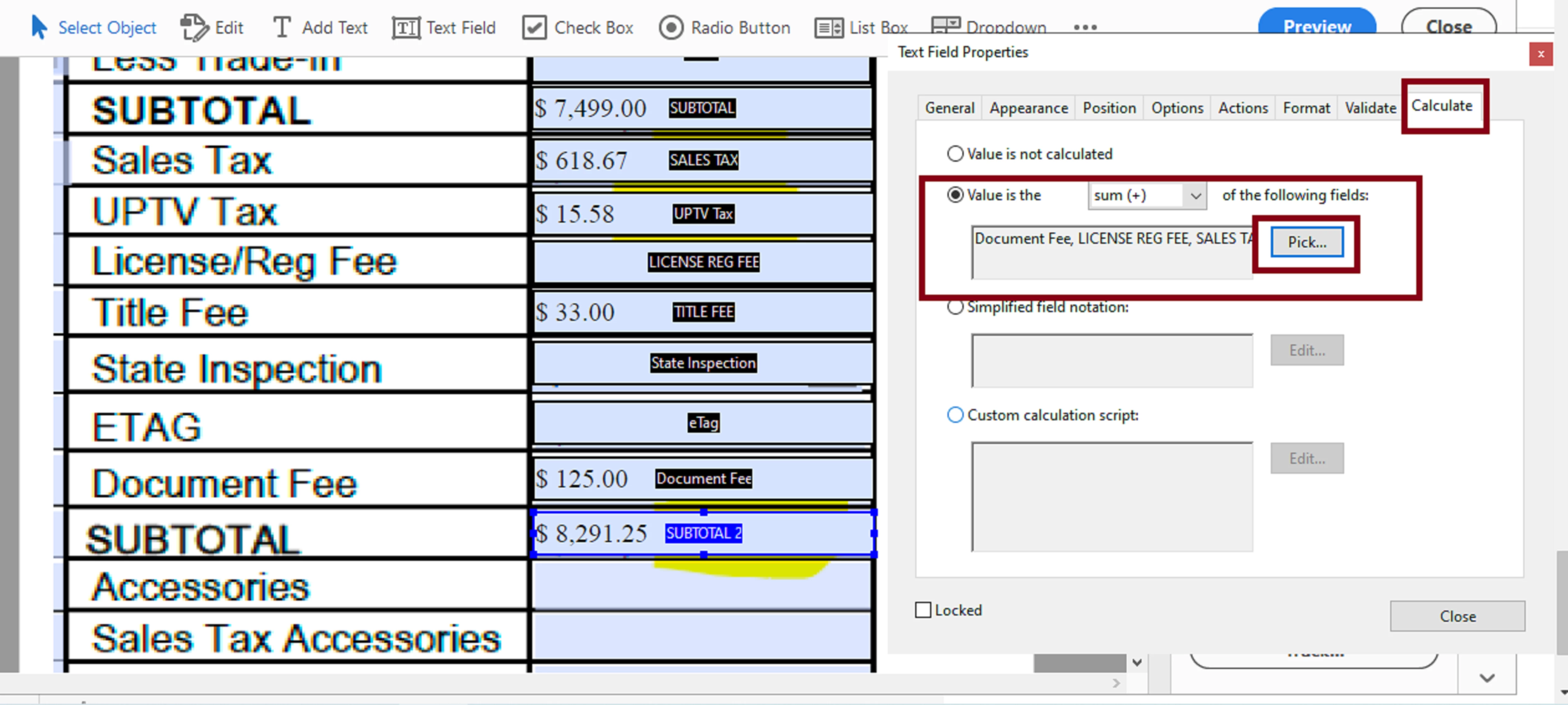
And in the "SUBTOTAL 2" field you can use the Acrobat's built-in "sum (+)" feature in the calculate tab. See slide :


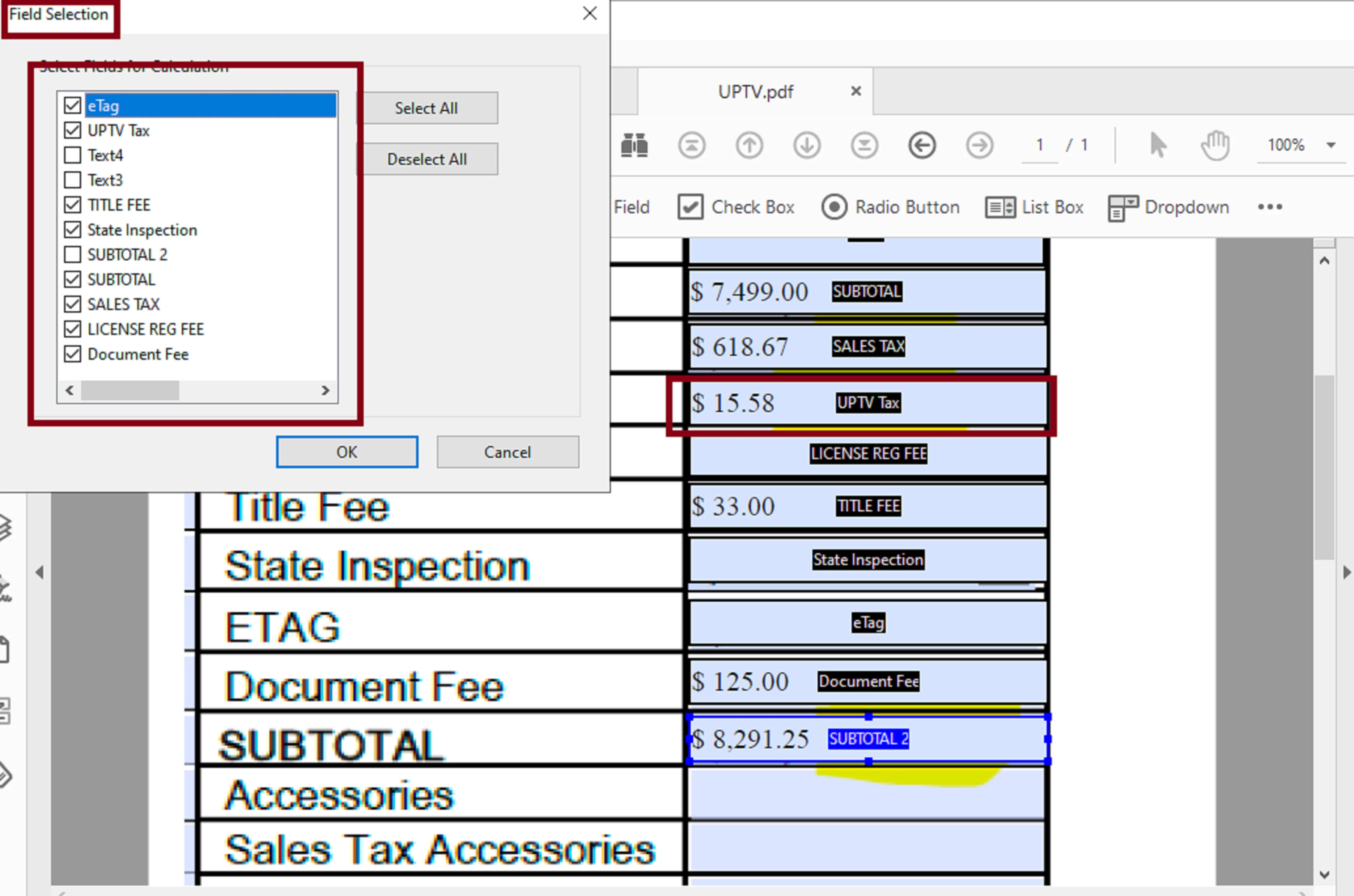
When you click on the "Pick" button just select the fields that will be used to add their values:


This actually rounded perfectly as you can see in the slide above under the "SUBTOTAL 2" field.

2 replies

Nesa Nurani
Community Expert
Community Expert
November 4, 2020

In "SUBTOTAL" field if you use calculation, try something like this:

 event.value = Math.ceil(your calculation goes here);

jessicaj68929848
Participating Frequently
November 4, 2020

I tried this as I thought it should look, but it's giving me syntax errors saying I'm missing ) at end of lines. See below:


event.value = Math.ceil(SUBTOTAL + SALES TAX + UPTV Tax + LICENSE REG FEE + TITLE FEE + State Inspection + eTag + Document Fee);

When I hit OK it gives me this message: SyntaxError: missing ) after argument list 1: at line 2


Nesa Nurani
Community Expert
Community Expert
November 4, 2020

You need to use field names in custom calculation like this:
event.value = Math.ceil(this.getField("SUBTOTAL").value+this.getField("SALES TAX").value...etc

Bernd Alheit
Community Expert
Community Expert
November 4, 2020

Post the question in the forum for Adobe Acrobat. 

jessicaj68929848
Participating Frequently
November 4, 2020

I thought I had. I tried posting in the other Adobe Acrobat forum, and was just redirected back to this forum to post.