


Inspiring
October 14, 2025
Question

Need scripting help

  • October 14, 2025
  • 2 replies
  • 238 views

Working with Adobe Acrobat 10 Pro. Trying to add following script at document level not to allow spacebar as first character for any text field in the document,

function spacebar()
{

var v = AFMergeChange(event);
if (/^\s/.test(v)) event.rc = false;

}

The function works pefectly. However, this action changes all date fields format from default "dd-mmm-yyyy"  to "AFDate_FormatEx("dd-mmm-yyyy");" custom format which I don't want. Apparently non-English Adobe Acrobat does not recognizes "AFDate_FormatEx("dd-mmm-yyyy");" format and date fields become invisible, empty, or non-descriptive text.
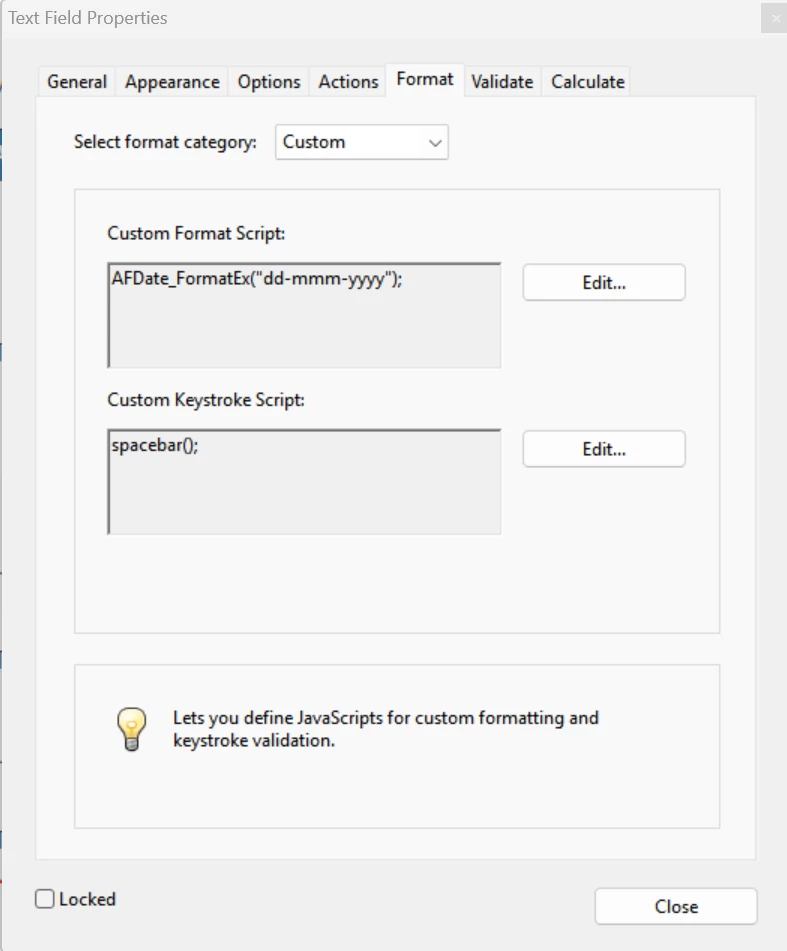
 

How could I prevent the date field format changing from default "dd-mmm-yyyy" to 

"AFDate_FormatEx("dd-mmm-yyyy");"

Thanks in advance for any help


    2 replies

    try67
    Community Expert
    Community Expert
    October 14, 2025

    You can't. If you use your own Keystroke or Format script it will replace the one the application uses when you select the Date option under Format. It will also mean that the calendar widget won't appear when the user uses the field.

    Inspiring
    October 21, 2025

    Thanks so much for your reply.

    Nesa Nurani
    Community Expert
    Community Expert
    October 14, 2025

    You can try a validation script that will remove 'spacebar' at the beginning once the user enters date:

    event.value = event.value.replace(/^\s+/, "");

    Inspiring
    October 21, 2025

    Thanks. The document has more than 200 date fields that are automatically filled with PC current date when related "Initials" fields are entered.


    I will take your suggestion and perhaps add your code to "Initials" fields and see if that will do it.


    Thanks again fo your helpful reply.