


Participating Frequently
June 23, 2020
Answered

Need to disable the Acrobat DC startup/recent files page

  • June 23, 2020
  • 3 replies
  • 7363 views

I know the start-up/recent history page that pops up whenever you open a PDF in Acrobat DC is a locked feature, but it desperately needs to be an option. I open many PDFs in the course of my work and NOT ONE TIME have I needed this window. But EVERY TIME, it gets in the way of my work. I can't even use command-W to quick-close it. I see sooooo many complaints about this. Many experienced users find it incredibly annoying, to say the least. Please tell me when this is going to be made an option that we can turn on or off as WE choose.
Correct answer CharuKarwa

Hi,

Sorry for inconvenience.

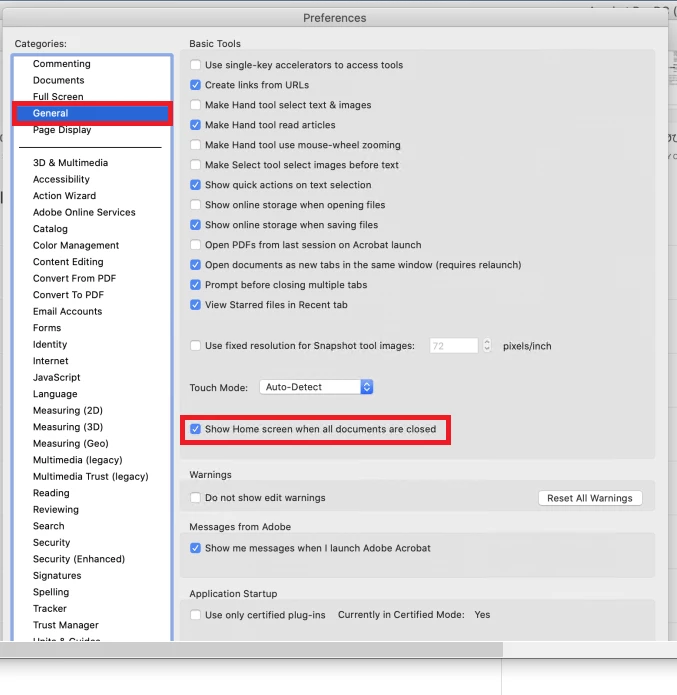
You can set a preference to close home screen when all documents are closed. 

1. Go to Preferences [command+k]

2. Choose the ‘General’ tab on the left

3. Uncheck ‘Show Home screen when all documents are closed’


Thanks,

Charu Karwa

3 replies

lyle5600
Participant
May 23, 2025

I have unclicked the box and the home screen still appears after windows are closed. Please advise. It seems as though Adobe is determined to colonize users' desktops. 

AnandSri
Legend
May 23, 2025

Hello @lyle5600!


I hope you are doing well, and thanks for reaching out.


Could you please provide more details about the issue? I noticed that you posted your question on an old community thread related to a previous version of Acrobat. Additionally, could you share a screenshot of the Preferences after you have selected them? Are you using a Mac or a Windows machine, and what version of the software are you running? Could you also share the workflow?


Please ensure you have the latest version of Acrobat installed on the machine: 25.001.20474 (Win) | 25.001.20476 (Mac), Apr 28, 2025. Check for any pending updates from the Menu > help > check for updates, install the updates, restart the app and the machine, and try again. ee this article to learn more about the Viewing preferences: https://adobe.ly/45li3cb


We're here to help, just need more info.

Thanks,

Anand Sri.

Participating Frequently
October 25, 2025

STILL having this problem. I'm fully updated to 2025.001.20756 on Mac OS 15.7.1 and unchecking the "Show homescreen…" option absolutely DOES NOT work.

Participant
February 9, 2023

Is there any news on this topic? Can't find the setting that CharKarwa mention. I have Adobe Acrobat Pro 2022 version.

Bernd Alheit
Community Expert
Community Expert
February 9, 2023

On Mac or Windows system?

CharuKarwaCorrect answer
Adobe Employee
June 23, 2020

Hi,

Sorry for inconvenience.

You can set a preference to close home screen when all documents are closed. 

1. Go to Preferences [command+k]

2. Choose the ‘General’ tab on the left

3. Uncheck ‘Show Home screen when all documents are closed’


Thanks,

Charu Karwa

Participant
September 4, 2022

Why is tha setting grey and does not allow me to change?