_Crockett_
Known Participant
March 13, 2019
Question

Nested Alternate Text — Link in a table cell

  • March 13, 2019
  • 2 replies
  • 3364 views

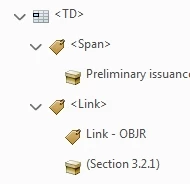
I have a document with table cells that have links to other document sections. The file passes PAC 3 checks, but fails the Acrobat check with Nested Alternate Text. Is there a way to keep the link (would be very useful to readers in this large document) and pass the checker?

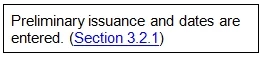
This is an example table cell. Section 3.2.1 is a hyperlink to the section with alternate text noting the section name.
Associated tags:
This topic has been closed for replies.

2 replies

Participant
July 6, 2022

[Posting for the benefit of others]

Be sure to check for alt text on your table. I've found default alt text placed on some styled tables, usually something like "An example of a basic three-column table with a heading row and horizontal borders between the rows." I'm not sure how it gets there, but it will cause a nested alternate text failure when the table cells contain links. 

Participant
October 17, 2022

Thank you jubie.  I could not figure out how to fix it and it was because the table had alt text.  Once I removed the table alt text, the error disappeared. 

Bevi Chagnon - PubCom.com
Legend
March 13, 2019

Your use of <Link> and <Link - OBJR> in a table <TD> cell is valid. I believe the Acrobat checker is in error here.

I hope an Adobe accessibility engineer will chime in on this post, but in the meantime, I'd ignore the error in Acrobat checker and go with the PAC3 report.

I encourage you to log this as a bug at https://acrobat.uservoice.com/   so that the programming team can address it.

|&nbsp;&nbsp;&nbsp;&nbsp;Bevi Chagnon &nbsp;&nbsp;|&nbsp;&nbsp;Designer, Trainer, &amp; Technologist for Accessible Documents ||&nbsp;&nbsp;&nbsp;&nbsp;PubCom |&nbsp;&nbsp;&nbsp;&nbsp;Classes &amp; Books for Accessible InDesign, PDFs &amp; MS Office |
_Crockett_
Known Participant
March 13, 2019

Thank you for the link—I have posted to that log.

I didn't see why this would be flagged by the checker for that reason, but thought I was misunderstanding nesting or the protocols.

Hopefully the checker was in error and the links can be read and followed. The document is a couple hundred pages of dense material in a complex structure and the links would be very helpful to all.

Bevi Chagnon - PubCom.com
Legend
March 13, 2019

I just did a test of various hyperlinks in a table and it passed the Acrobat checker.

So that we can help diagnose the problem can you give us the following:

  • Version of Acrobat Pro you're using to check the PDF (need the "build" number, such as 2019.010.20098 which is the latest release). You'll find this under Help / About Adobe Acrobat Pro.
  • Version of PDFMaker that was used to export the PDF from MS Word. You'll find this in the PDF itself under File / Properties / Description tab. Look for Application and PDF Producer.
  • If you used InDesign or another program to create the source document instead of Word, give us its version, too.
  • And if you used another product other than an Adobe-branded PDF maker utility, please give us that info.
|&nbsp;&nbsp;&nbsp;&nbsp;Bevi Chagnon &nbsp;&nbsp;|&nbsp;&nbsp;Designer, Trainer, &amp; Technologist for Accessible Documents ||&nbsp;&nbsp;&nbsp;&nbsp;PubCom |&nbsp;&nbsp;&nbsp;&nbsp;Classes &amp; Books for Accessible InDesign, PDFs &amp; MS Office |