neutralize color casts on greyscale parts of an sRGB image PDF without affecting other colors
Hello there,
Not sure where I should post this as I'm new to the forums.
I use both Photoshop CS4 ext and an old version of Acrobat Pro, but this issue is related to several customers of mine.
My company's main area of business is providing "cost per print" printing services to medical imaging customers (private clinics, medical practices etc) where diagnostic images are in the form of low res RGB image files digitized from medical modalities such as CT, MRI, UltraSound etc. Tipically our customers (the doctors) will select some of these images from the medical device's main application GUI, which will arrange them in a predetermined layout, and click a print command that will send the resulting page layout to one of our printers. In other situations the images are exported from the medical device application (usually JPG or PDF to a network folder) with an unknown profile, then opened with a PDF reader application (PDF Reader, PDF Architect, etc) then finally printed.
We generally use Epson WorkForce inkjet printers with standard GDI windows drivers and the OS is typically (a restricted version of) MS Windows 8 / 10.
Most of these images are contain greyscale and a few bits of color used to highlight measurements, blood direction and so on (imagine an x-ray with color marks), here is a good example:
https://www.dropbox.com/s/ekuhapzrzdcauqa/CONEBEAM-2.pdf?dl=0
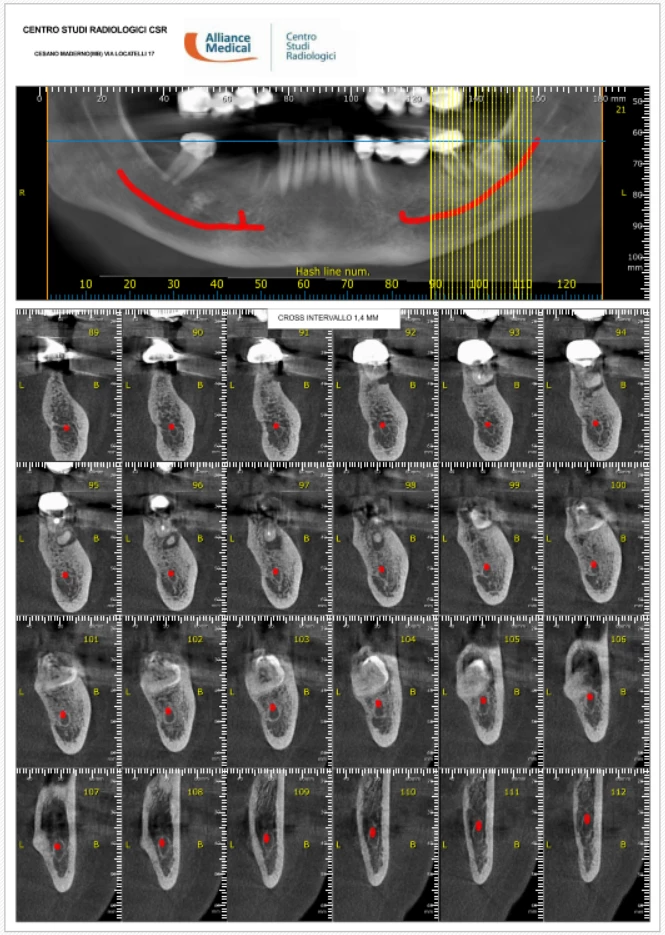
The MOST important thing for the doctors is to be able to have "neutral" greyscales and as much detail as possible on the prints. Unfortunately the medical device and the likely not calibrated color profiles used by the OS for the file conversions and printing often return RGB greyscale images with color casts on the greyscale parts (i.e. RGB values not exactly like xx/xx/xx) such as 157/157/157 but with small deviations from true sRGB greys, i.e. 157/155/157.
If the images are printed in greyscale the printer only uses black ink and the result is acceptable however this is not viable as the color details of the marks are also needed.
So I'm looking for a way to "neutralize" color casts from the greys (deviations from x/x/x of a certain % or range should be "brought back to" x/x/x) but without color correcting the color parts (reds, greens, etc). All this should happen directly from within a PDF reader sw (maybe using a particular color profile or other middleware).
some Xerox printers have this driver setting ("Print sRGB greys with Pure black") but the Epson printers I am familiar with don't have this.
I hope someone can point me in the right direction.
Thanks and kindest regards
Mattia
PS - I do have an X-Rite i1 Studio but not very familiar on how to use it for this task.
 AdChoices