


Participant
July 22, 2024
Resuelto

New Acrobat UI/White Behind PDFs/How to Make Gray

  • July 22, 2024
  • 1 respuesta
  • 274 visualizaciones

With the old UI, my PDFs were surrounded by gray, which helped distinguish them from the background. The new UI displays them surrounded by white. Is there some way to change this in the new UI? The all white is brutal on the eyes. I've searched for theme or background display, but can't find anything. Can this be "fixed" in the new UI? I have Acrobat Pro 2024.002.20759 (and this is on my company laptop, so if there's a newer version, I have to wait until IT pushes it out). Thanks.
Este tema ha sido cerrado para respuestas.
Mejor respuesta de Tariq Ahmad

Hi @rcbjr2


Following up to check if you have found an answer already. If not, you may try the following:

  • Launch Acrobat.
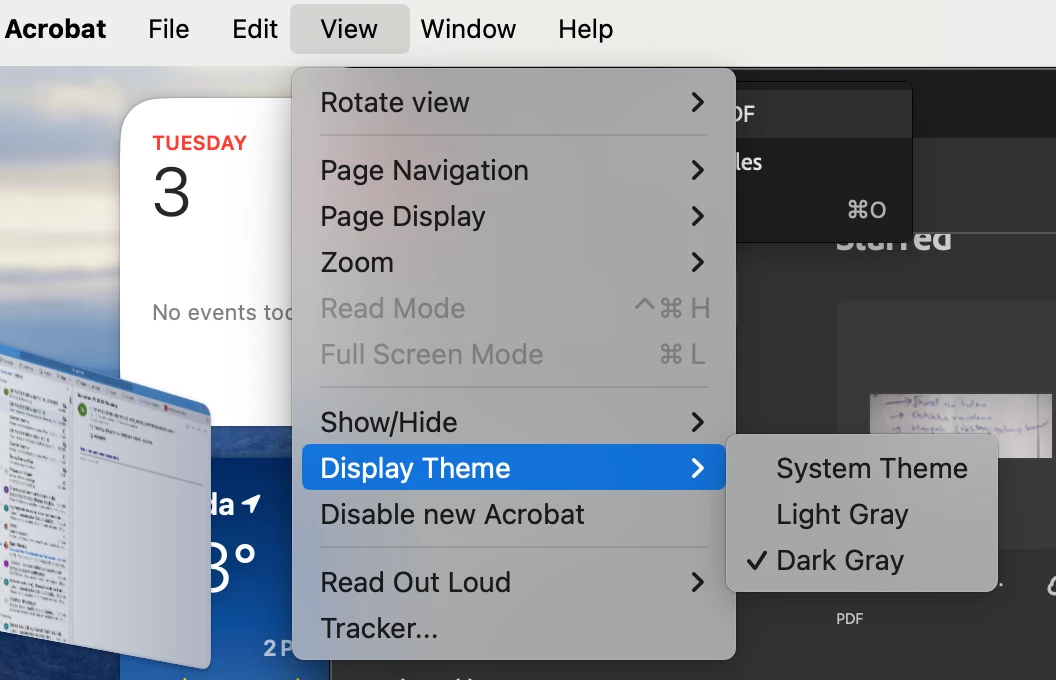
  • Click On View Menu - Display Theme - Choose one that helps you out (Screenshot attached)


~Tariq

1 respuesta

Tariq AhmadCommunity ManagerRespuesta
Community Manager
September 3, 2024

Hi @rcbjr2


Following up to check if you have found an answer already. If not, you may try the following:

  • Launch Acrobat.
  • Click On View Menu - Display Theme - Choose one that helps you out (Screenshot attached)


~Tariq