Hi maria_paula_0056,
Thank you for reaching out.
If you wish to switch the Acrobat sign to classic version, please use the following steps:
- Open the Acrobat online link (https://acrobat.adobe.com/link/home/) and sign in using your Adobe credentials.
- Once signed in, click on the profile icon and select settings.
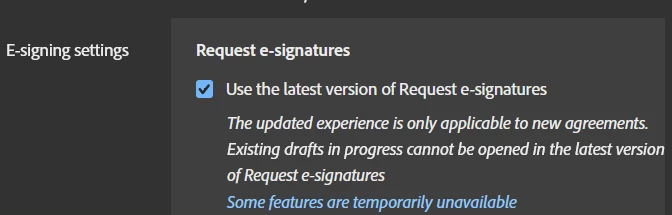
- In the settings window, go to E-Sign settings.
- Unmark the box for "Use the latest version of Request e-signatures."
- Click on the Save button at the bottom to save the changes.
Check if that helps.
Let us know how it goes.
Thanks,
Meenakshi
Got your issue resolved? Please label the response as 'Correct Answer' to help your fellow community members find a solution to similar problems.




 AdChoices