New Adobe Acrobat not installing Windows 11 24h2
I'm having issues installing subscription version of Adobe Acrobat DC on a brand new laptop that already has Windows 11 24h2 not upgrade.
Is there a fix or workaround to get it installed?

I'm having issues installing subscription version of Adobe Acrobat DC on a brand new laptop that already has Windows 11 24h2 not upgrade.
Is there a fix or workaround to get it installed?
So after much troubleshooting I was able to finally get Adobe Acrobat installed. All things online for fixes I tried all still failed.
I changed permissions on all adobe folders on the c drive to everyone. Then I used task manager to locate the temp folder it extracted which was here.
C:\Users\%Username%\AppData\Local\Temp\{418FC083-82E1-4398-96F8-D1BEB2AB7E6F}\Acrobat_DC_Web_x64_WWMUI\Adobe Acrobat
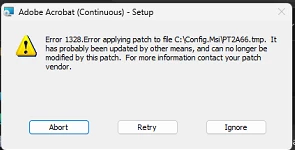
I then ran setup.exe using run as administrator. It went through setup fine it gave this one error:

I checked the location but couldn't find it so I clicked on Ignore. It finished setup launched program verified it opened ok and shows my subscription is signed in. Also, set it as default pdf app. I opened Creative Cloud and it now shows Adobe Acrobat with no install errors. I did check to see if there was any program updates through creative cloud but it said I was up to date.
I hope Adobe fixes their issue.
Already have an account? Login
Enter your E-mail address. We'll send you an e-mail with instructions to reset your password.