


Inspiring
April 3, 2026
Question

New Issue with Create PDF, Multiple Files batch processing of MS Word docs

  • April 3, 2026
  • 2 replies
  • 22 views

To process invoices from MS Word doc to PDF I use Acrobat Pro's "Create PDF > Multiple Files" which has worked fairly smoothly for years. Recently on invoice day, it's now not working.

Acrobat Pro won't process it saying that I have to change MS Word Privacy Preferences. It appears that Microsoft is not allowing the docs to be processed locally and forcing a user to batch on the MS website/cloud, which I DO NOT want.

This was never an issue before. I don't know if something is broken or they simply changed something where you can't do batch processing on your computer (locally) and forcing you to use MS cloud. Any help would be appreciated.

Working with:
Acrobat Pro Version 2026.001.21346
Word Version 16.107.3 (26032814)
Mac Mini M4 Mac OS Sequoia 15.7.4
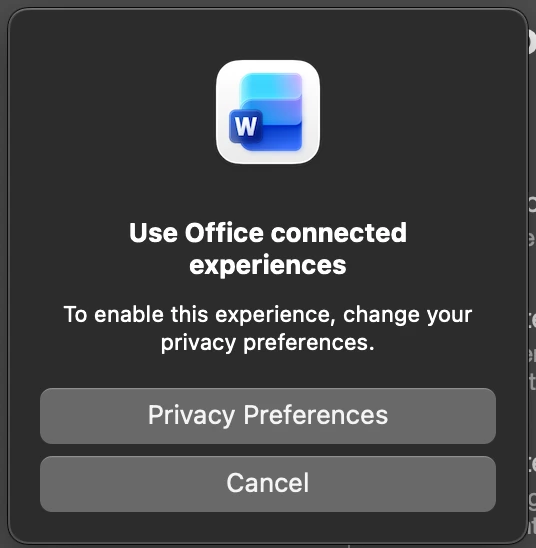
Error I receive when trying to batch process Word doc to PDF.


    2 replies

    ls_rbls
    Community Expert
    Community Expert
    April 4, 2026

    Hi ​@karenc62466730 ,


    If this is strictly a personal computer, you should be able to turn off the optional connected experiences that interact with online cloud services.


    Such settings or disabling them are  not configured with Adobe Acrobat though. 


    See official Microsoft guidance posted below:

    • "To turn off Microsoft Office connected experiences, navigate to File > Account > Manage Settings (under Account Privacy) in any Office app and uncheck "Turn on optional connected experiences". This stops features that analyze content, use online services, and download content, though some essential services may remain."

    If you'd like to become more amiliarized with Office Connected Experiences, please also use the links below as reference:


    Hopefully this helps.

    Inspiring
    April 4, 2026

    But that’s the problem, I do have Connected Experiences off and it’s not working because of that. MS is forcing me to use CE in order to process the PDF online. However I don’t want to process it through MS server. 

    This is a new issue, I’ve always been able to batch Create PDF locally on my computer until this issue recently popped up.

    ls_rbls
    Community Expert
    Community Expert
    April 4, 2026

    But that’s the problem, I do have Connected Experiences off and it’s not working because of that. MS is forcing me to use CE in order to process the PDF online. However I don’t want to process it through MS server. 

    This is a new issue, I’ve always been able to batch Create PDF locally on my computer until this issue recently popped up.


    Could you please share a screenshot of the settings that you've disabled?


    I can test on my end and see what could've been missed.


    I don't experience that issue with a personal computer when I work with shared files.


    However,  it is worth noting that, if the file source that I am trying to export was produced and shared by another user, it may have security restrictions that were set on their end by CE services.


    In which case, the only workaround is to Save As a copy, which allows me to edit that copy.


    This, however, I have to do manually one  file at a time; I haven't found a way to process in bulk yet.


    INPORTANT NOTE:

    The key ingredient here is what you've observed right off the bat in regards of Online services. For instance, if the files are downloaded from an Outlook mailbox, be aware that Microsoft 365 doesn't allow to turn off connected experience for mailbox synchronization.


    ls_rbls
    Community Expert
    Community Expert
    April 4, 2026

    Hi ​@karenc62466730 ,


    Just curious… is this happening at work, like for example, many users collaborating with Office365 and Sharepoint?


    Or is this happening just on a personal computer at home?

    Inspiring
    April 4, 2026

    Hi, It’s on strictly a personal computer