


Participating Frequently
April 3, 2025
Answered

No Default Value in Fillable PDF Calculation

  • April 3, 2025
  • 2 replies
  • 993 views

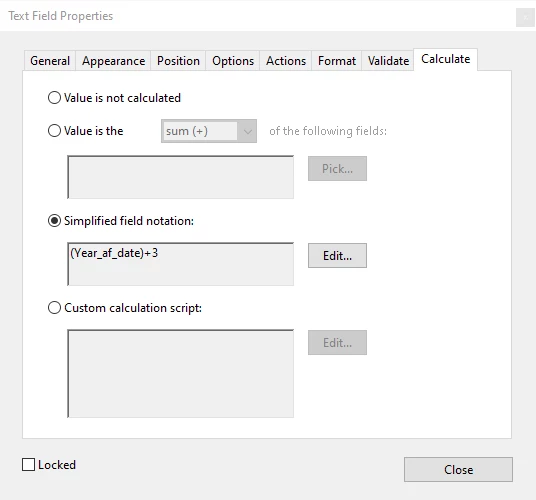
Hello, I'm hoping someone might be able to assist me.  I'm in the process of developing a fillable PDF whereby I would like to add a value of '3' to the current year, to reflect when the contract will expire/end.  Currently, I have a field whereby the user enters in the year (e.g. 2025; the field is called 'Year_af_date'), and further down in the document I need to add the expiry/end date.  For the expiry/end date field, I have used Simplified Field Notation with '3' added to the year field ('Year_af_date').  However, upon previewing the PDF, the '3' appears as a default value until the current year (e.g. 2025) is entered.  I have tried everything to eliminate the default value of '3', but to no avail.  This seems like it should be a simple fix.. Would anyone know how to prevent the '3' from appearing?
 

Before the date field is updated:

After the date field is updated: (i.e. 2025 +3)

I would appreciate any suggestions!  Thanks in advance!


Correct answer mian_youtube2001

In the expiry field’s properties, use Custom Calculation Script (not Simplified Notation):

var y = this.getField("Year_af_date").value;
event.value = y ? Number(y) + 3 : "" 

Ensure the expiry field’s Default Value is blank.

Save/close/reopen the PDF to test.

  1. ave/close/reopen the PDF to test.

2 replies

mian_youtube2001Correct answer
Participant
April 4, 2025

In the expiry field’s properties, use Custom Calculation Script (not Simplified Notation):

var y = this.getField("Year_af_date").value;
event.value = y ? Number(y) + 3 : "" 

Ensure the expiry field’s Default Value is blank.

Save/close/reopen the PDF to test.

  1. ave/close/reopen the PDF to test.

watts2025Author
Participating Frequently
April 4, 2025

Thank you very much!  With the code you provided, I was able to get it working as I'd hoped.  I greatly appreciate your assistance!  🙂 

PDF Automation Station
Community Expert
Community Expert
April 3, 2025

Use the following custom calculation script instead:

if(!this.getField("Year_af_Date").value)

{event.value=""}

else

{event.value=Number(this.getField("Year_af_Date").value)+3;}

watts2025Author
Participating Frequently
April 3, 2025

Thanks for the advice!  I copy and pasted your suggestion; however, I received the following error (note: I am not familiar with any scripting languages, so I don't know how to fix it..)

Please advise!


PDF Automation Station
Community Expert
Community Expert
April 4, 2025

Please see my corrected script in my previous post.