Question
No FeatureLockdown following "Acrobat crashes in a dual-monitor setup on Windows" workaround
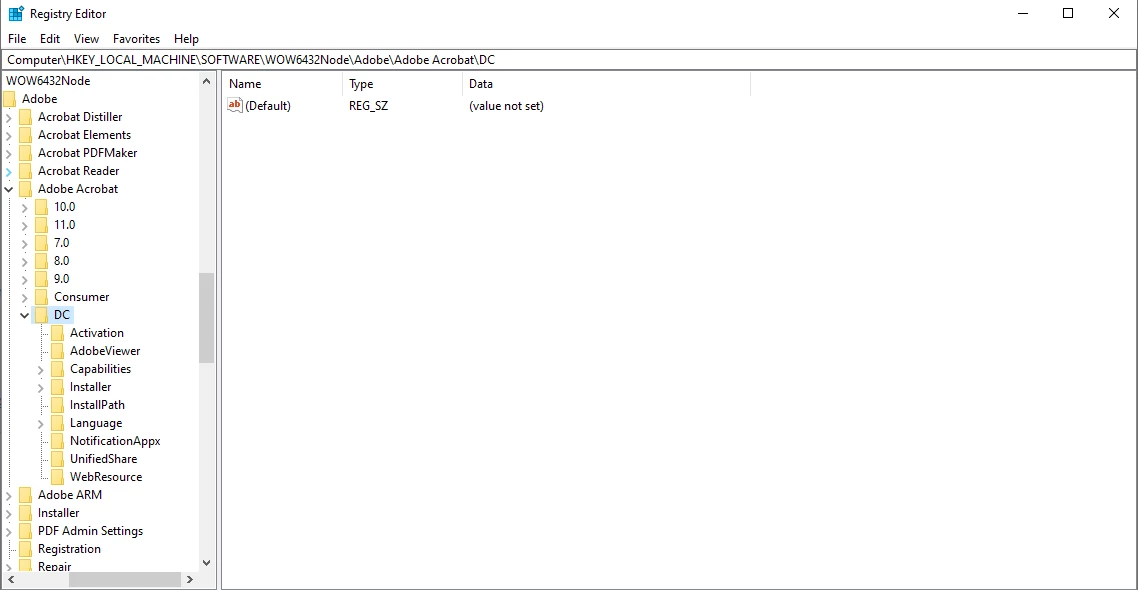
I ran into the issue exactly as described in Acrobat crashes in a dual-monitor setup on Windows, and tried to fix it following the workaround, but I was unable to complete step 3, as I did not seem to have `\FeatureLockdown` in my registry. Below is a screen capture of my registry. Since the instructions didn't mention the possibility of FeatureLockdown not being there, so I wanted to check before creating it myself, and maybe see if there are other solutions/workarounds to this problem.
Also I have the most recent version of Adobe Acrobat Pro DC (2020.013.20074) in case that makes a difference. Any help is appreciated!
 AdChoices