Participant
November 21, 2023
Answered

No label tag <lbl> when converting Word to PDF

  • November 21, 2023
  • 1 reply
  • 1392 views

Hi all,

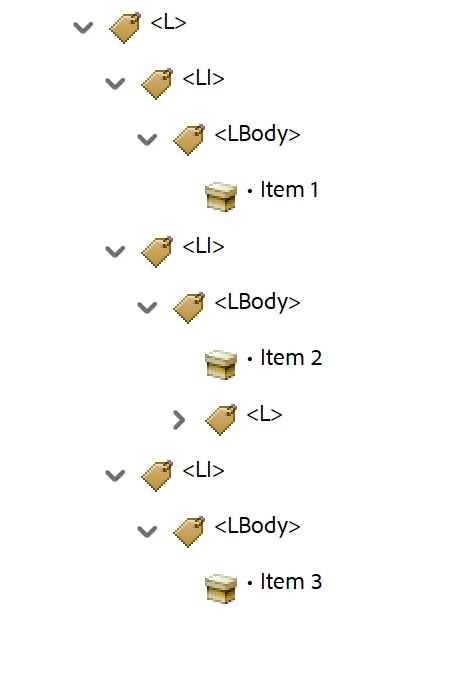
I am seeing a change in the way Adobe coverts Word lists to PDF.  Lists Item now only contain LBody and no Lbl tags. Both the bullet and text content are combined in the LBody.

Is this new feature/change with tags, or is this an error that is occuring?

Thanks for all feedback and information.


Correct answer Bevi Chagnon - PubCom.com

This is a known bug in Adobe's PDF Maker since forever and not a recent change. However, the MS utility to export accessible PDF doesn't have the bug so you might be confusing the two export options.


Although the PDF/UA standard requires the <Lbl> tag on the bullet/number character, accessibility isn't negatively impacted when it's missing, especially if you've used a Unicode bullet (U+2022) or other glyph. Screen readers recognize the Unicode character and voice it correctly.


The PDF/UA standard has another "error" regarding the <Lbl> tag when tagging naked lists. These are lists that do not have a number, bullet, or other character on each <LI>, such as with a list of employees, a recipe's list of ingredients, etc.  In these naked lists, there shouldn't be an <Lbl> tag, just an <LBody>.


Generally, we don't bother correcting Word lists that are missing the <Lbl> tag because in most cases, the missing <Lbl> tag doesn't create an inaccessible list. But when we have the time or tools to correct them in Acrobat, we do add the <Lbl>.


1 reply

Bevi Chagnon - PubCom.com
Legend
November 21, 2023

This is a known bug in Adobe's PDF Maker since forever and not a recent change. However, the MS utility to export accessible PDF doesn't have the bug so you might be confusing the two export options.


Although the PDF/UA standard requires the <Lbl> tag on the bullet/number character, accessibility isn't negatively impacted when it's missing, especially if you've used a Unicode bullet (U+2022) or other glyph. Screen readers recognize the Unicode character and voice it correctly.


The PDF/UA standard has another "error" regarding the <Lbl> tag when tagging naked lists. These are lists that do not have a number, bullet, or other character on each <LI>, such as with a list of employees, a recipe's list of ingredients, etc.  In these naked lists, there shouldn't be an <Lbl> tag, just an <LBody>.


Generally, we don't bother correcting Word lists that are missing the <Lbl> tag because in most cases, the missing <Lbl> tag doesn't create an inaccessible list. But when we have the time or tools to correct them in Acrobat, we do add the <Lbl>.


|&nbsp;&nbsp;&nbsp;&nbsp;Bevi Chagnon &nbsp;&nbsp;|&nbsp;&nbsp;Designer, Trainer, &amp; Technologist for Accessible Documents ||&nbsp;&nbsp;&nbsp;&nbsp;PubCom |&nbsp;&nbsp;&nbsp;&nbsp;Classes &amp; Books for Accessible InDesign, PDFs &amp; MS Office |
Participant
November 27, 2023

Thank you so much for your reply. I have shared this info with my team so everyone is aware of it.