
Participant
August 9, 2023
Question

No longer have edit PDF option after re-installing Acrobat

  • August 9, 2023
  • 1 reply
  • 549 views

Hello,


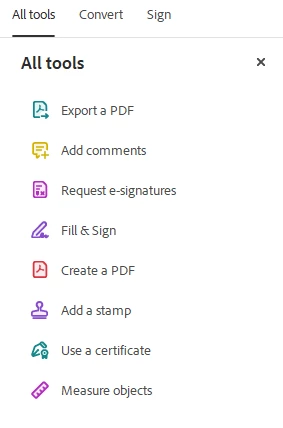
A few months ago I got a new work laptop and I had to re-install my Adobe apps onto the new machine. When I installed Acrobat I noticed that I no longer have the option to edit PDFs - this is troubling as I need to use that feature to adjust font size in certain form fields on a few PDFs. 


Does anyone know why this went away and how I can get it back??


I'm attaching an image of the options I have. There used to be an "Edit PDF" option, but now there is not.
This topic has been closed for replies.

1 reply

Meenakshi_Negi
Legend
August 10, 2023

Hi Rebekah5E38,


Thank you for reaching out.


Please try reinstalling the application using the following steps:
-Remove the application and run the cleaner tool (https://www.adobe.com/devnet-docs/acrobatetk/tools/Labs/cleaner.html).
-Reboot the machine
-Install Adobe Acrobat from the following page: https://helpx.adobe.com/acrobat/kb/acrobat-dc-downloads.html

Check if the tool appears.


Click the View More option at the bottom of the All Tools pane. See if the options appear in that list below.

If the option does not appear, share the Acrobat and OS version numbers.

Also, let us know if you use the application on a personal or the works machine.


Thanks,

Meenakshi