Participant
February 28, 2024
Answered

No option for First Page and Last Page on navigation bar

  • February 28, 2024
  • 4 replies
  • 1304 views

I'm using Acrobat on Mac (build version 23.8.20555.0), and there seems to be no option to add the First Page or Last Page options to the navigation bar. If I go to 'View > Page Naviation' I can see the options for First Page and Last Page but they are shaded out and not selectable. Is there a way to add the First Page and Last Page options to the navigation bar? They're so useful.


Secondly, is there an option to move the navigation bar from the bottom right to the top middle, like the old Acrobat? It's much more convieient at the top.


Thanks

Correct answer jonc33645010

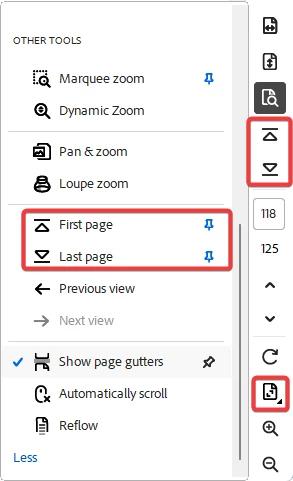
Eventually, Adobe added the ability to add them but, they are not with the previous and next but close.  If you click on the page view button, then scroll down you can find them.  Click to pin them.

4 replies

Participant
June 26, 2025

At least hitting the home key will take you to the first page of the document and hitting the end key will take you to the last page of the document, but I still don't see a way to put home and end on the bar that contais whatever it contains on the right side of the screen. 

Participant
June 26, 2025

At least hitting the home key will take you to the first page of the document and hitting the end key will take you to the last page of the document, but I still don't see a way to put home and end on the bar that contais whatever it contains on the right side of the screen.  

jonc33645010
jonc33645010Correct answer
Participating Frequently
June 30, 2025

Eventually, Adobe added the ability to add them but, they are not with the previous and next but close.  If you click on the page view button, then scroll down you can find them.  Click to pin them.

jonc33645010
Participating Frequently
June 30, 2025

Forgot to mention that I posted a screenshot to show the steps.

jonc33645010
Participating Frequently
March 26, 2024

I totally agree!  The lack of being able to add them is ridiculous.  Why should I need to move my hand from the mouse/track pad to the keyboard just to go to the first or last page.  And, even though I've been using the new UI for months, it still is not in a convenient or logical location.

Participant
January 3, 2025

adobe non ha idea di come vengono utilizzati i propri software e poi creano questo problemi a chi ci lavora da anni


Amal.
Legend
February 28, 2024

Hi @robh32 


Hope you are doing well and thanks for reaching out.


The option to move the navigation bar from the bottom right to the top middle, like the old Acrobat is not yet present. You may share your feedback directly with the engineering team using the link https://www.adobe.com/products/wishform.html


For information about the page navigation in the new Acrobat, please go through the help page https://helpx.adobe.com/acrobat/using/navigating-pdf-pages.html and see if that works.


~Amal