


Participant
July 22, 2025
Question

No option to set default mail application

  • July 22, 2025
  • 3 replies
  • 797 views

Hello!

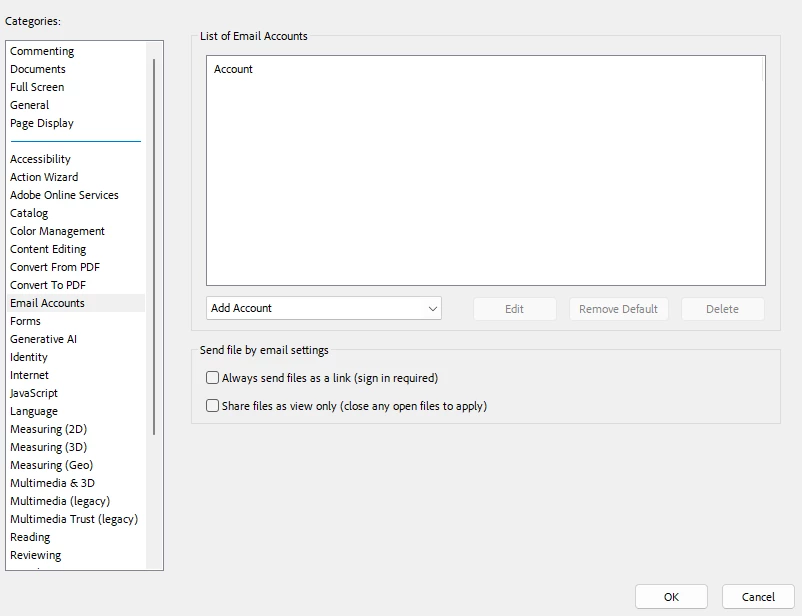
I am trying to set outlook as my default mail application in adobe acrobat pro.  I go to Preferences>Email Accounts and it only gives me the option to add an email account, not to select the default app to use.    Any help would be greatly appreciated!  
3 replies

Participant
September 25, 2025

After some extensive research I found this:
1. Adobe Acrobat/Reader relies on MAPI (Messaging Application Programming Interface) when you choose options like “Send File as Attachment” or “Attach to Email”.
2. As of now, New Outlook does not support the traditional MAPI interface. The “New Outlook” client is built more like a web-app wrapper rather than a full native Outlook with COM / MAPI internals.

Solution:  You’d either need classic Outlook (Microsoft made every effort to prevent this) or configure a different MAPI-capable mail client (e.g. Mozilla Thunderbird).

Or maybe... just maybe.... Adobe could start supporting non-MAPI desktop clients?

Participant
November 6, 2025

Thank you very much 🙂 

PDF Automation Station
Community Expert
Community Expert
July 22, 2025

You have to add the account before you can make it your default.

Participant
July 27, 2025

I have tried adding both a gmail account or an outlook account both revert to sending a form to the draft folder and the action dies at that point.


I am trying to create a form that I can email directly and it is not opening Microsoft Outlook as my default because it will not let me add it as my default email application.  Any thoughts?

PDF Automation Station
Community Expert
Community Expert
July 28, 2025

Is Outlook your default email program on your computer (Settings > Default Apps)?

Community Manager
July 22, 2025

Hi @christa_1524,


Thanks for reaching out!


It looks like there might be some confusion between an email account (like Gmail, https://adobe.ly/3GLSp6J, etc.) and an email application (also called a client) that Adobe Acrobat can use to send emails, such as Microsoft Outlook, Apple Mail, or Mozilla Thunderbird.


Acrobat relies on a locally installed desktop email application to send emails (like when you use “Send as Attachment”). Web-based email (like going to Gmail in a browser) isn’t supported directly for this feature.


Set your default email accounts in Acrobat

You can add, delete, or set your desired email account as default in Acrobat.

  1. Go to the hamburger menu (Windows), or Acrobat menu (macOS) > Preferences.

  2. Choose Email Accounts in the Categories. Do any of the following tasks:

    • Set default email account: Choose an email account and select Make Default.
    • Delete an email account: Choose an email account and select Delete.
    • Add account: Select Add Account and enter the required information when prompted.


  3. Select OK.

Let us know what system and email app you’re using, and we can guide you more specifically!


Best regards,
Tariq | Adobe Community Team

Participant
July 27, 2025

Thank you for replying.  I am trying to set Microsoft Outlook as my default application and it is not an option.  When I set up a gmail address or my outlook email it goes to a draft folder that does not exist and the mailto option is not an option.  Any advice here?