Known Participant
April 21, 2025
Question

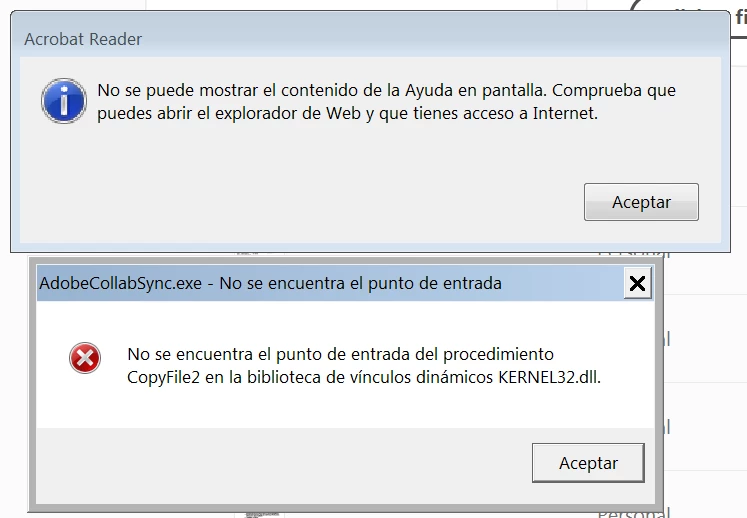
No se encuentra el punto de entrada del procedimiento CopyFile2 en KERNEL32
  • April 21, 2025
  • 1 reply
  • 4052 views

No se encuentra el puntode entrada del procedimiento CopyFile2 en KERNEL32

1 reply

Amal.
Legend
April 21, 2025

Hi there


Hope you are doing well and thanks for reaching out.


Would you mind sharing the version of the Acrobat Reader and the OS you are using? Go to Help > About Acrobat and make sure its updated to the latest version 25.01.20458. Go to Help > Check for updates and reboot the computer once.


This issue is related to the Office 2016 installation, as it does not always install the VS2015 runtime on computers. Please Download Microsoft Visual C++ 2015 runtime from Microsoft Download Center. Install it by double-clicking the downloaded file - vc_redist.x64.exe (on 64-bit computers) and vc_redist.x86.exe (on 32-bit computers).


For more information, please check the help page https://adobe.ly/4iuDBG9


Let us know how it goes.


AndrosAuthor
Known Participant
April 21, 2025

Hola, gracias,

Version: 25.001.20458
Windows.7.pro
Office 2016

Microsoft Visual C++ 2015
vc_redist.x64.exe
No he podido instalar, porque Windows7 dice que ya lo tengo (que no es cierto).


AndrosAuthor
Known Participant
April 29, 2025

Hello!


Thanks for sharing the details. 


The latest version of Acrobat or Acrobat Reader can be installed on Windows 7 SP1 (32-bit and 64-bit). Please ensure you have all the available mandatory and optional updates related to the operating system installed. Then download and install the Visual C++ Redistributable, restart the machine and check.

You can download and install the Acrobat Reader and run it in compatibility mode. Right-click on the Acrobat shortcut icon on the desktop and select Properties. Select the Compatibility tab, and choose 'Run this program in compatibility mode for: select the operating system'. Click Apply, and then OK. Restart the machine.

Try logging into another user profile on the same machine. If Acrobat Reader works well in that profile, the issue may be related to your user profile. For further assistance, contact your operating system (OS) support.


Note: Starting January 2023, Adobe Acrobat and Acrobat Reader will no longer support 32-bit operating systems, including product and security updates. For more information, see End of support on 32-bit operating systems | Adobe Acrobat, Acrobat Reader.


Thanks,

Anand Sri.


Problema, NO RESUELTO.