
Participating Frequently
October 4, 2021
Answered

Not able to share a link, email pdf or share file with others.

  • October 4, 2021
  • 7 replies
  • 36908 views

We have various Acrobat versions, including Pro DC. While having a pdf open and then attempting to Share a link, Send file by Email, Share this file with Others, they all bring up a blank window/box.
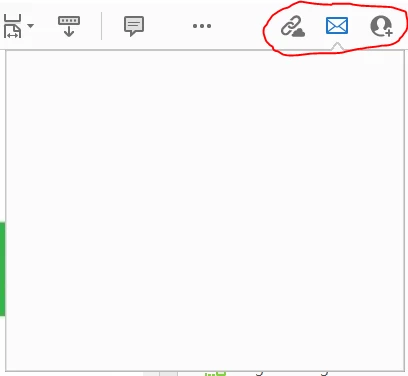
Started happening for our users a few weeks ago and not everyone at the same time. We thought we had it fixed by going to Edit>Preferences>General and unchecking the box next to "Show online storage when saving files", but that only works for a day or less and then we need to do a repair or a full reinstall.  Any ideas why this started happening and how we proactively fix this before more users experience it?

This topic has been closed for replies.
Correct answer Amal.

Hi there


Sorry to keep you waiting. The planned update for Adobe Acrobat/Reader DC version 21.11.20039  is now available. Please update the application from the help menu > Check for updates  and reboot the computer once.

You may also download the patch manually from the link https://www.adobe.com/devnet-docs/acrobatetk/tools/ReleaseNotesDC/index.html  and see if that works for you.


For more information about the new release please check the help page https://helpx.adobe.com/acrobat/using/whats-new.html


Let us know if you experience any trouble and need more help


Regards

Amal

7 replies

Participating Frequently
July 8, 2024

Any help avalable? It is July 2024.

Participating Frequently
July 8, 2024

Hi There,

this problem seems to go on forever:

Does somebody know how to share a PDF file with NO ERROR?
Sorry but this is a basic and essential function!


Participant
March 2, 2022

Also having this problem!

Running: macOS Monterey 12.1,
Acrobat:

Architecture: x86_64

Processor: Apple M1 Pro

Build: 21.11.20039.0

AGM: 4.30.115

CoolType: 6.0.3

JP2K: 2.0.4.50016


Unable to Share Link, Email or Share with Others... all are blank. (See attached.) 

Participant
October 25, 2022

I've been having issues with sharing files as well. The people I share with keep getting a message saying the file has been unshared or deleted (it hasn't, and it hasn't been moved either).  I'm stumped.  According to the program I'm using, it is up to date.  I'm using Adobe Acrobat Pro version 2022.003.20263

Amal.
Community Manager
Community Manager
October 28, 2022

Hi @CariShepard26486370nt1m 


We are sorry to hear that. Is this an issue with a particular PDF file or with all the PDFs? Please try with a different PDF file and check. Also, how are the other users opening the PDF files? Make sure the other people are opening the PDF via Acrobat/Reader DC application and ask them to update the application to the recent version from the help menu.


Regards

Amal

Amal.
Community Manager
Amal.Community ManagerCorrect answer
Community Manager
January 11, 2022

Hi there


Sorry to keep you waiting. The planned update for Adobe Acrobat/Reader DC version 21.11.20039  is now available. Please update the application from the help menu > Check for updates  and reboot the computer once.

You may also download the patch manually from the link https://www.adobe.com/devnet-docs/acrobatetk/tools/ReleaseNotesDC/index.html  and see if that works for you.


For more information about the new release please check the help page https://helpx.adobe.com/acrobat/using/whats-new.html


Let us know if you experience any trouble and need more help


Regards

Amal

SJSlaski
Participant
January 13, 2022

Hello Amal,

I upgraded my Acrobat Pro DC 32 bit to v2021.011.20039 but the share file options are still blank on my work laptop which is running Win7.  My home PC runs Win10 and the Acrobat Pro DC 32 bit share file options work fine, perhaps Win7 is the issue?

Best,

Scott

Amal.
Community Manager
Community Manager
February 9, 2022

Hi there 


Sorry for the delay in response. This issue is reported to our engineering team for the fix.


We will share the update as soon as we will hear anything form them


Regards

Amal

Participant
December 28, 2021

I am having the same problem. 

Participant
December 21, 2021

Hello,

A coleague is having the same issues on the DC version 2021.007.20099
We tried repairing the install, but it did not work.
Is there any fix for this?


Amal.
Community Manager
Community Manager
December 22, 2021

Hi there


I have shared more details with you in private message please check


Regards

Amal

Amal.
Community Manager
Community Manager
October 5, 2021

Hi Brian


Hope you are doing well and sorry for the trouble. As described you are getting the blank screen when you try to share the PDF via link, email or share with others.


Would you mind sharing the version of the Adobe Acrobat/Raeder DC you are using? To check the version go to Help > About Acrobat  and make sure you have the latest version 21.07.20095 (Win) , 21.07.20096 (mac) installed. Go to help > Check for updates and reboot the computer once.


Please try to reset the Acrobat preferences as described here - https://community.adobe.com/t5/acrobat-discussions/how-to-reset-acrobat-preference-settings-to-default/m-p/4792082


You may also, try to create a new test user profile with full admin rights in Windows and try using the application there and check.


Regards

Amal


Participating Frequently
October 5, 2021

Hello Amal.  Hope you are doing well too.  As described, I checked my version and the version for a few others experiencing this issue and we are all on version 21.07.20095 for Windows. I also tried the suggestion to reset Acrobat preferences shown in the provided link and that did not fix the issue. 


I am in our IT dept. and have full admin rights on my Windows machine and that does not make a difference either.  Any other suggestions would be appreciated.


Regards, Brian

Amal.
Community Manager
Community Manager
October 8, 2021

Hi there


We are sorry to hear that. Would you mind collecting the logs of the affected machine as described here - https://helpx.adobe.com/creative-cloud/kb/cc-log-collector.html and share the logs with us as descried here https://helpx.adobe.com/document-cloud/help/sharing-pdfs.html


Regards

Amal