
Participant
March 1, 2022
Question

Not able to unlock text

  • March 1, 2022
  • 2 replies
  • 785 views


Hi, 

I used "text locked" for one certain document for my client but since then my adove does not let me type text. 

So far I tried following steps..

- Unselected "lock" and marked "Make Propteries defalt" on the original document 

- Deleted the original document
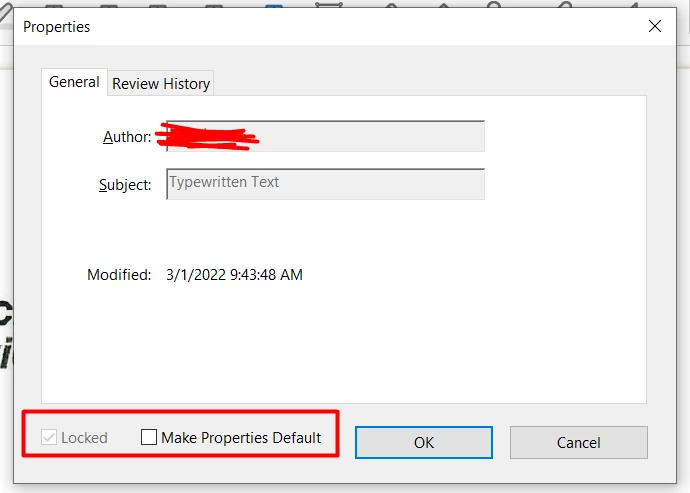
 

  Anyone please help me to solve this iuuse since I need to add some text on pdf files for my work.... 


Thank you 

This topic has been closed for replies.

2 replies

try67
Community Expert
Community Expert
March 2, 2022

Click the comment, then press Ctrl+J and paste the following code into the Console window that opens:


this.selectedAnnots[0].setProps({lock: false, readOnly: false});


Then select it with the mouse or keyboard and press Ctrl+Enter. That will unlock the selected comment. Then right-click it and set its properties as the new defaults.


If you want to unlock all the comments in the file at once use this code:


this.syncAnnotScan();
var annots = this.getAnnots();
if (annots!=null) {
	for (var i in annots) {
		var annot = annots[i];
		annot.setProps({lock: false, readOnly: false});
	}
}


NpandaAuthor
Participant
March 8, 2022


Hi I apologize for my late response.

It does not allow me to use the feature. Is there any other way to fix this problem? 


Thank you

Participant
October 7, 2024

I AM HAVING THE SAME ISSUE, CAN NOT FIND A SOLUTION. DID YOU HAPPEN TO FIND ONE?

Amal.
Legend
March 1, 2022

Hi there


Hope you are doing well and sorry to hear that.


  • Would you mind elaborating an bit more about the issue? What is the workflow/steps you did to lock the text in the PDF file?
  • What happens when you try to add text to the PDF? Do you get any error message? If yes, please share the screenshot of the same for a better understanding.
  • Have you signed the PDF file? If yes, once the PDF file is signed it gets locked for further changes. Please try to recreate the PDF file from the original source file and see if that works for you.


Regards

Amal


NpandaAuthor
Participant
March 1, 2022

Hi Amal,

Thank you for your response.

Please see my answers as below

(1) I took the steps; right click --> properties --> maeked "Locked" for the sentence I wanted to uneditable.


(2) There is no error message or anything but when I work on different pdf files and try to add text, it just does not let me type anything and shows up the lock-sign on the right side. 

(3) No I did not sign on my pdf file. 

Please let me know if you need more info from me.


Thank you