


Question
Noto font not working in Acrobat, works fine in PDF-XChange Editor
This question is about our creating a PDF in our library, not using Acrobat to create. If this is the wrong forum for such a question, can you please tell me where to post?
We create PDF files in our library (our own home-grown solution).
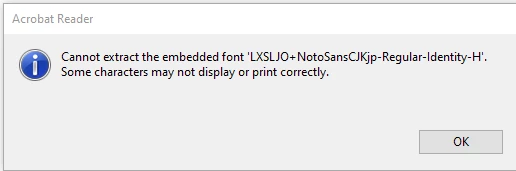
Using the Noto fonts for CJK glyphs, the PDF we create displays fine in PDF-XChange Editor but in Acrobat we get a warning dialog and then two of the lines don't display. File: ATE-3106.pdf
I've tried to figure out what we have wrong, but I haven't been in our PDF code in years and so I'm finding I'm not remembering much. What is incorrect in what we're writing? We're encoding using identity-h.
 AdChoices